
If you searched for “Documentor WordPress plugin” and ended up here, you were probably trying to install it, update it, or bring it back to life on your site.
Here’s the short version: you can’t, and you shouldn’t.
The Documentor plugin was closed on WordPress.org back in March 2022 due to a security issue, and it hasn’t been updated since. That’s four years of no fixes, no compatibility updates, and no support.
The good news is there’s a modern alternative built specifically for WordPress product documentation. More on that in a minute. First, let’s look at what actually happened.
What Happened to the Documentor WordPress Plugin?
Documentor (also listed as “documentor-lite”) was a documentation plugin built by Internet Techies. It had a free version on WordPress.org and a paid version sold on documentor.in.
On March 29, 2022, the WordPress.org plugin team closed the plugin. The reason listed on the plugin page is direct:
“This plugin has been closed as of March 29, 2022 and is not available for download. Reason: Security Issue.”
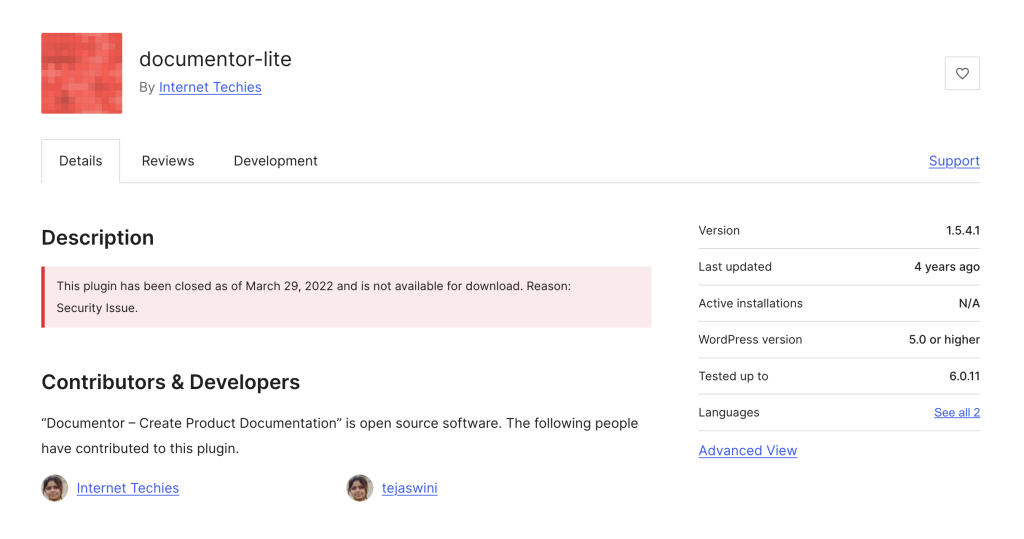
A few other red flags on the plugin page:
- Last updated: 4 years ago
- Active installations: N/A
- Tested up to: WordPress 6.0.11
WordPress is now well past 6.0, and PHP has moved on too. A plugin frozen at that version is a liability, not a tool.
Should You Still Use Documentor in 2026?
No. Three reasons:
1. There’s an unfixed security issue. WordPress.org doesn’t close plugins lightly. When they do, and they specifically cite security, it means there’s a known vulnerability that was never patched. Installing it on a live site is asking for trouble.
2. It’s four years out of date. Even if the security issue didn’t exist, the plugin hasn’t been touched since 2022. WordPress core, PHP, and the block editor have all moved significantly since then. You’ll hit compatibility problems fast.
3. There’s no support. If something breaks, there’s nobody to fix it. The plugin page is frozen, and the team hasn’t shipped anything new in years.
Even if the paid version on documentor.in is technically still sold, the closure on WordPress.org is the clearest signal you’ll get that this tool is not safe to rely on for production documentation.
What Documentor Users Actually Need
Let’s step back from the plugin itself and think about the real job people hired Documentor to do.
If you were looking for Documentor, you probably wanted:
- A way to create product documentation inside WordPress
- Organized categories and a clean structure for users to navigate
- A searchable frontend so visitors can actually find answers
- Something self-hosted, so your docs live on your site and not on some SaaS tool
- Something lightweight and affordable
That’s a reasonable list, and it’s exactly what AssistCamp was built for.
Meet AssistCamp: A Modern Documentor Alternative
AssistCamp is a self-hosted documentation plugin for WordPress, built specifically for plugin authors, theme developers, and SaaS teams who want their product docs to live inside their own site.
It’s built by DotCamp, the same team behind ConvertForce, OpinionCamp, and WP Block Suite, so it’s made by people who publish WordPress documentation every day and understand what actually matters.
If you want a full walkthrough of every feature, there’s a detailed guide here: What Is AssistCamp and How Does It Work?
How AssistCamp Covers What Documentor Offered
Here’s how the core Documentor features map to AssistCamp:
-
Product documentation: Dedicated “Docs” post type with the full Gutenberg block editor
-
Document organization: Hierarchical categories with parent and child support
-
Reorder articles: Drag-and-drop category organization from the admin
-
Multiple documentations: Multiple knowledgebases under a single site
-
Translation: Works with WPML, TranslatePress, and other translation plugins
-
Clean frontend: Built-in documentation pages with breadcrumbs, sidebar navigation, and search
What AssistCamp Adds That Documentor Never Had
AssistCamp isn’t just a like-for-like replacement. It brings things Documentor never offered:
-
Multiple knowledgebases. Perfect if you run more than one product. Each knowledgebase has its own categories, tags, and frontend page.
-
Native Gutenberg editing. Write docs using the same block editor you use for the rest of your site. No custom editor to learn.
-
Global search. Built-in search across all your documentation, plus per-knowledgebase search.
-
BetterDocs import. If you’re coming from another documentation plugin, AssistCamp can pull your existing docs over.
-
Full export tool. Back up or move your documentation between sites with a single click.
-
Active maintenance. Security patches, bug fixes, and new features on an ongoing basis.
AssistCamp vs Documentor at a Glance
| Feature | Documentor | AssistCamp |
|---|---|---|
| Status on WordPress.org | Closed (security issue) | Under review |
| Last updated | 2022 | Actively maintained |
| Editor | Classic | Gutenberg blocks |
| Multiple knowledgebases | No | Yes |
| Import from other plugins | No | BetterDocs import (planned) |
| Export tool | No | Yes |
| Frontend search | Basic | Built-in global search |
| Drag-and-drop organization | Articles only | Categories |
| Security updates | None | Ongoing |
| Support | None | Active |
How to Install AssistCamp
Quick note: AssistCamp is currently under review at WordPress.org, so you won’t find it in the plugin directory just yet. That will change soon.
In the meantime, you can download it directly from assistcamp.com.
Installation takes about two minutes:
- Download the AssistCamp zip file from assistcamp.com
- In your WordPress admin, go to Plugins > Add New > Upload Plugin
- Upload the zip and click Install Now
- Activate the plugin
- Follow the setup wizard to create your first knowledgebase
The setup wizard walks you through creating a knowledgebase, adding default categories (Getting Started, Features, API Reference, FAQ), and generating sample content so you’re not staring at a blank screen.
For a full walkthrough with screenshots, check the AssistCamp overview guide.
Other Documentor Alternatives Worth Considering
To be fair, AssistCamp isn’t the only option out there. If you want to explore a few more before deciding, here are some solid picks:
- BetterDocs. Popular freemium documentation plugin with templates and analytics. Good choice if you want a big-name option with a free tier.
- weDocs. Free and simple. A decent match for basic documentation needs.
- Heroic Knowledge Base. Premium only, but feature-rich for larger teams that need Slack integration and advanced analytics.
- Echo Knowledge Base. Free version available, with paid add-ons. Works well with page builders.
That said, if you specifically liked Documentor because it was self-hosted, lightweight, and focused on product documentation without a lot of bloat, AssistCamp is the closest match in spirit.
Final Thoughts
Documentor had a good run, but its time is over. The plugin was closed for a security reason that was never fixed, and leaving it installed on any site in 2026 is a real risk.
If you need to build product documentation in WordPress today, you have better options. AssistCamp is the one we built to fill exactly this gap: self-hosted, WordPress-native, and made for product teams who want their docs to feel like part of their site instead of a tacked-on afterthought.
Download AssistCamp and give it a try, or read the full walkthrough to see how it works in detail.
Leave a Reply