Author: Istiak Rayhan

  • Documentor WordPress Plugin: Why It’s Gone and What to Use Instead

    If you searched for “Documentor WordPress plugin” and ended up here, you were probably trying to install it, update it, or bring it back to life on your site.

    Here’s the short version: you can’t, and you shouldn’t.

    The Documentor plugin was closed on WordPress.org back in March 2022 due to a security issue, and it hasn’t been updated since. That’s four years of no fixes, no compatibility updates, and no support.

    The good news is there’s a modern alternative built specifically for WordPress product documentation. More on that in a minute. First, let’s look at what actually happened.

    What Happened to the Documentor WordPress Plugin?

    Documentor (also listed as “documentor-lite”) was a documentation plugin built by Internet Techies. It had a free version on WordPress.org and a paid version sold on documentor.in.

    On March 29, 2022, the WordPress.org plugin team closed the plugin. The reason listed on the plugin page is direct:

    “This plugin has been closed as of March 29, 2022 and is not available for download. Reason: Security Issue.”
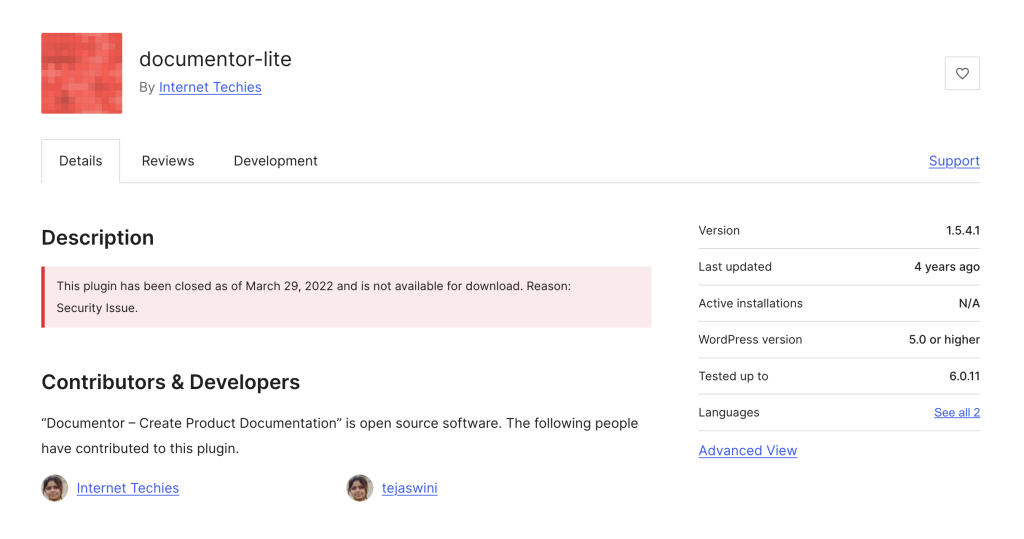
    A few other red flags on the plugin page:

    • Last updated: 4 years ago
    • Active installations: N/A
    • Tested up to: WordPress 6.0.11

    WordPress is now well past 6.0, and PHP has moved on too. A plugin frozen at that version is a liability, not a tool.

    Should You Still Use Documentor in 2026?

    No. Three reasons:

    1. There’s an unfixed security issue. WordPress.org doesn’t close plugins lightly. When they do, and they specifically cite security, it means there’s a known vulnerability that was never patched. Installing it on a live site is asking for trouble.

    2. It’s four years out of date. Even if the security issue didn’t exist, the plugin hasn’t been touched since 2022. WordPress core, PHP, and the block editor have all moved significantly since then. You’ll hit compatibility problems fast.

    3. There’s no support. If something breaks, there’s nobody to fix it. The plugin page is frozen, and the team hasn’t shipped anything new in years.

    Even if the paid version on documentor.in is technically still sold, the closure on WordPress.org is the clearest signal you’ll get that this tool is not safe to rely on for production documentation.

    What Documentor Users Actually Need

    Let’s step back from the plugin itself and think about the real job people hired Documentor to do.

    If you were looking for Documentor, you probably wanted:

    • A way to create product documentation inside WordPress
    • Organized categories and a clean structure for users to navigate
    • A searchable frontend so visitors can actually find answers
    • Something self-hosted, so your docs live on your site and not on some SaaS tool
    • Something lightweight and affordable

    That’s a reasonable list, and it’s exactly what AssistCamp was built for.

    Meet AssistCamp: A Modern Documentor Alternative

    AssistCamp is a self-hosted documentation plugin for WordPress, built specifically for plugin authors, theme developers, and SaaS teams who want their product docs to live inside their own site.
    It’s built by DotCamp, the same team behind ConvertForce, OpinionCamp, and WP Block Suite, so it’s made by people who publish WordPress documentation every day and understand what actually matters.

    If you want a full walkthrough of every feature, there’s a detailed guide here: What Is AssistCamp and How Does It Work?

    How AssistCamp Covers What Documentor Offered

    Here’s how the core Documentor features map to AssistCamp:

    • Product documentation: Dedicated “Docs” post type with the full Gutenberg block editor
    • Document organization: Hierarchical categories with parent and child support
    • Reorder articles: Drag-and-drop category organization from the admin
    • Multiple documentations: Multiple knowledgebases under a single site
    • Translation: Works with WPML, TranslatePress, and other translation plugins
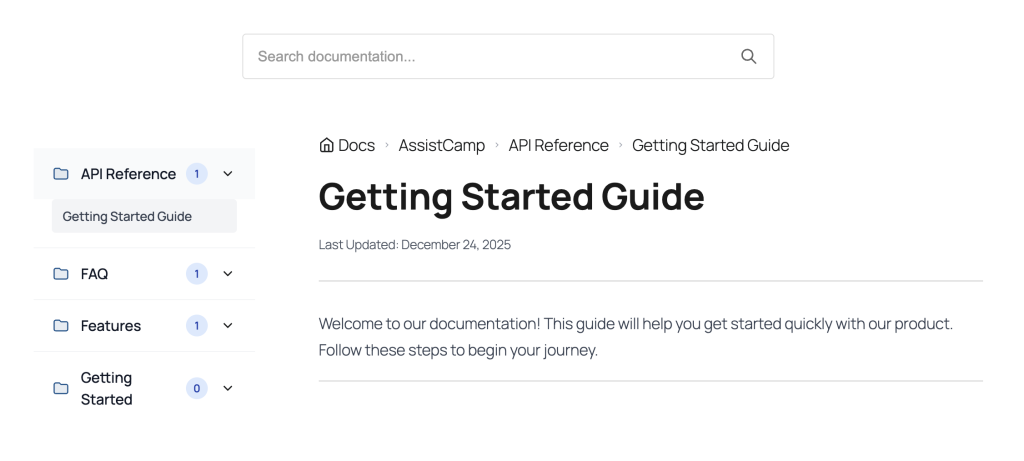
    • Clean frontend: Built-in documentation pages with breadcrumbs, sidebar navigation, and search

    What AssistCamp Adds That Documentor Never Had

    AssistCamp isn’t just a like-for-like replacement. It brings things Documentor never offered:

    • Multiple knowledgebases. Perfect if you run more than one product. Each knowledgebase has its own categories, tags, and frontend page.
    • Native Gutenberg editing. Write docs using the same block editor you use for the rest of your site. No custom editor to learn.
    • Global search. Built-in search across all your documentation, plus per-knowledgebase search.
    • BetterDocs import. If you’re coming from another documentation plugin, AssistCamp can pull your existing docs over.
    • Full export tool. Back up or move your documentation between sites with a single click.
    • Active maintenance. Security patches, bug fixes, and new features on an ongoing basis.

    AssistCamp vs Documentor at a Glance

    FeatureDocumentorAssistCamp
    Status on WordPress.orgClosed (security issue)Under review
    Last updated2022Actively maintained
    EditorClassicGutenberg blocks
    Multiple knowledgebasesNoYes
    Import from other pluginsNoBetterDocs import (planned)
    Export toolNoYes
    Frontend searchBasicBuilt-in global search
    Drag-and-drop organizationArticles onlyCategories
    Security updatesNoneOngoing
    SupportNoneActive

    How to Install AssistCamp

    Quick note: AssistCamp is currently under review at WordPress.org, so you won’t find it in the plugin directory just yet. That will change soon.

    In the meantime, you can download it directly from assistcamp.com.

    Installation takes about two minutes:

    1. Download the AssistCamp zip file from assistcamp.com
    2. In your WordPress admin, go to Plugins > Add New > Upload Plugin
    3. Upload the zip and click Install Now
    4. Activate the plugin
    5. Follow the setup wizard to create your first knowledgebase

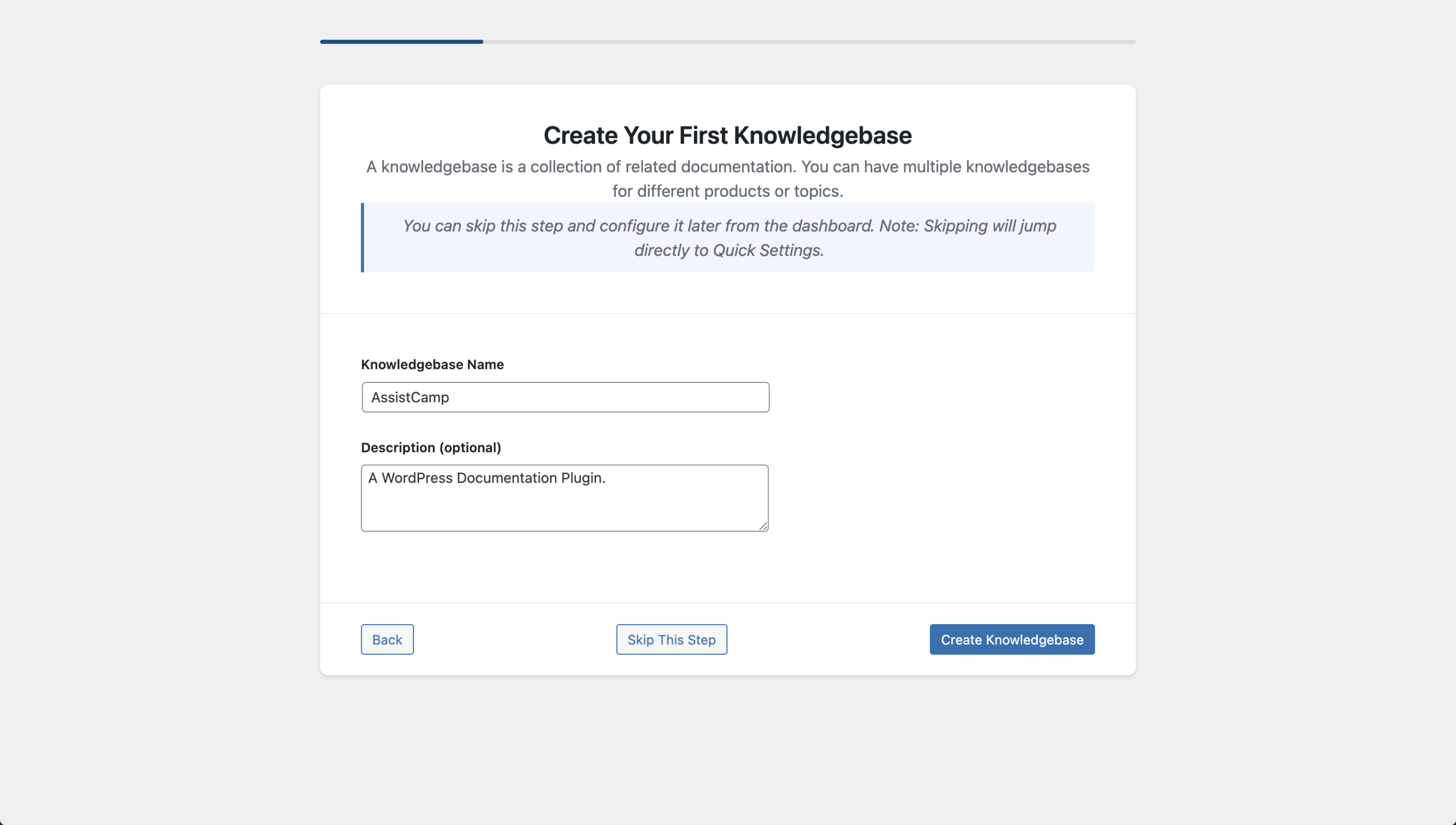
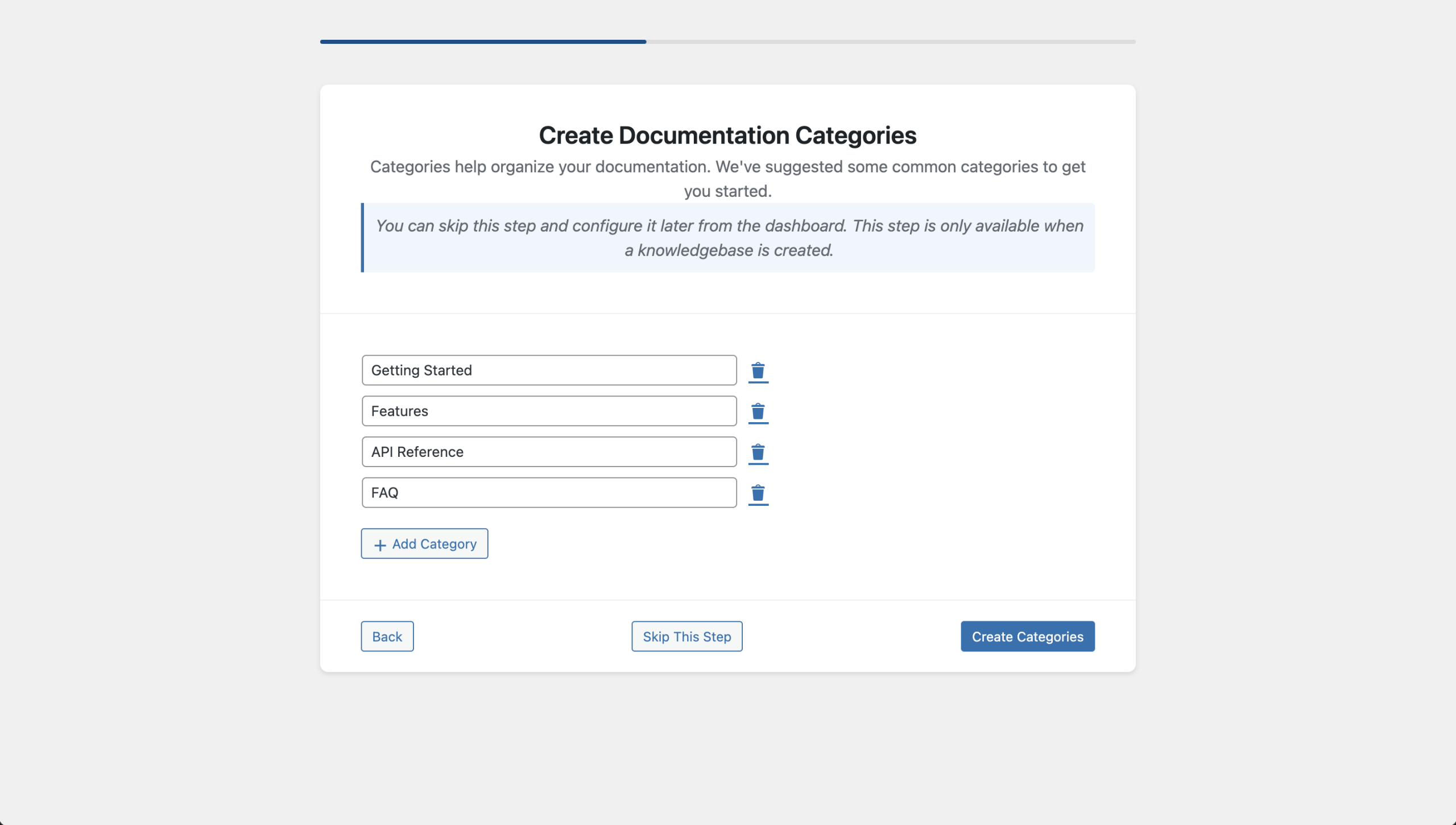
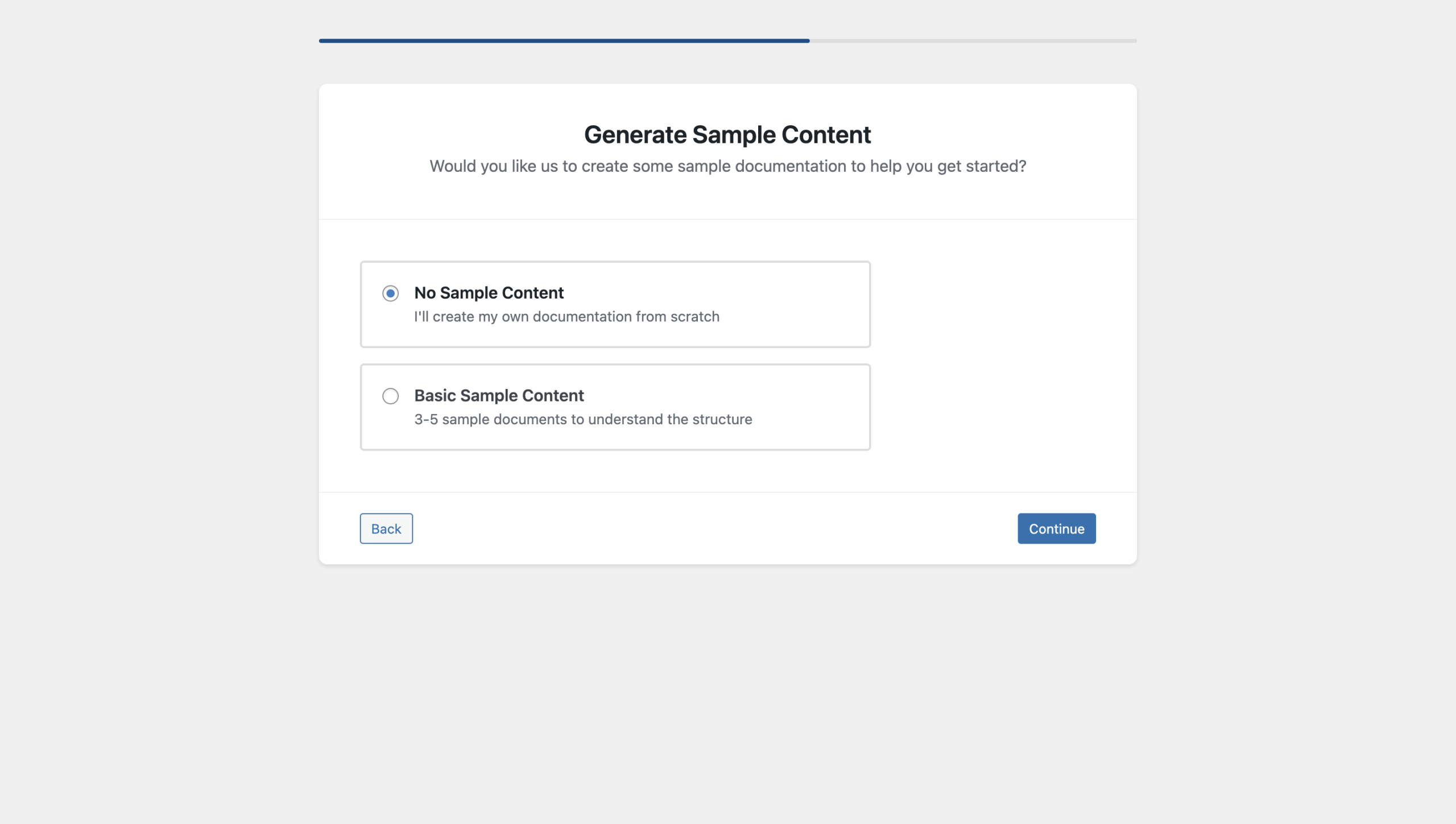
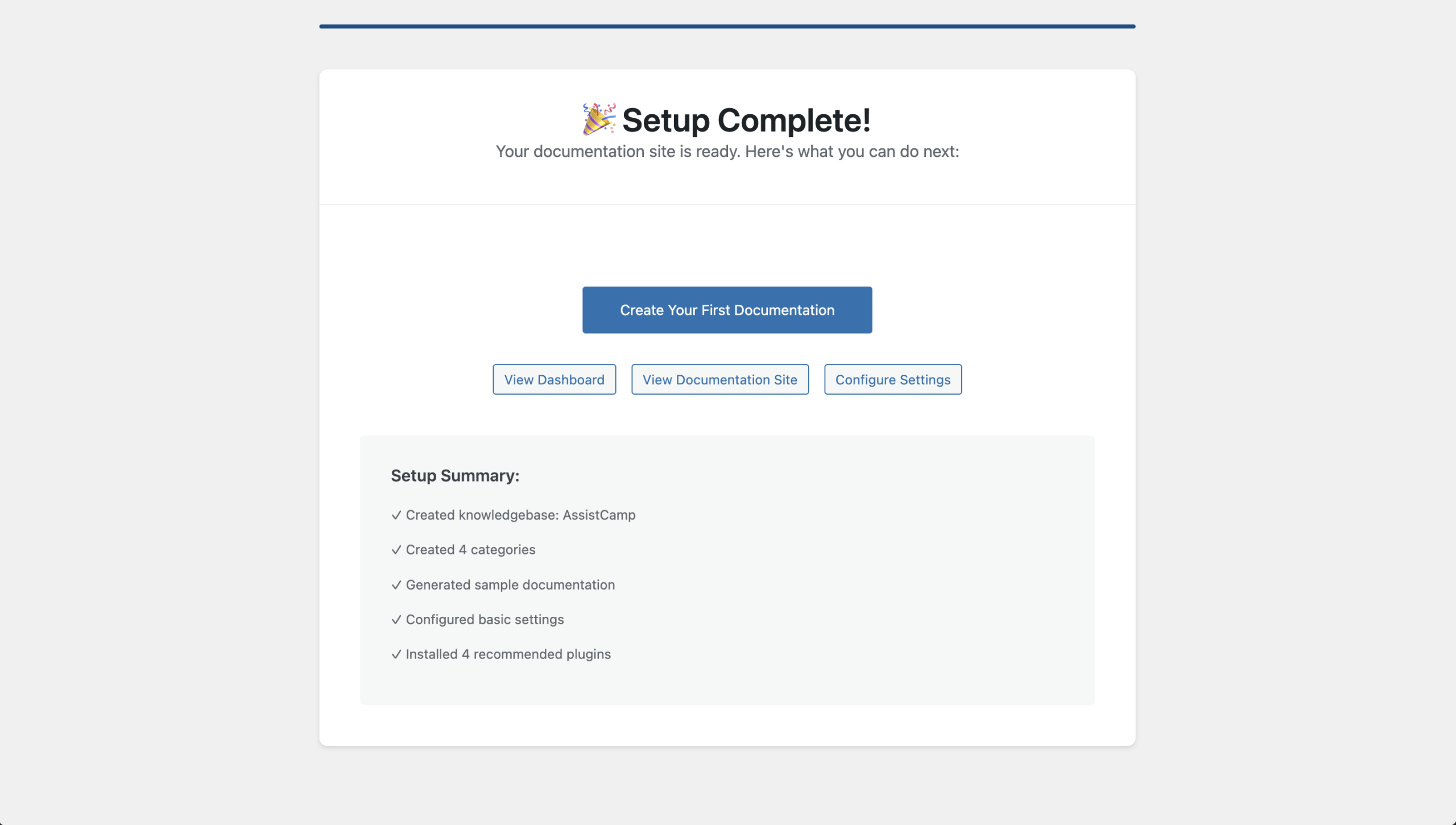
    The setup wizard walks you through creating a knowledgebase, adding default categories (Getting Started, Features, API Reference, FAQ), and generating sample content so you’re not staring at a blank screen.

    For a full walkthrough with screenshots, check the AssistCamp overview guide.

    Other Documentor Alternatives Worth Considering

    To be fair, AssistCamp isn’t the only option out there. If you want to explore a few more before deciding, here are some solid picks:

    • BetterDocs. Popular freemium documentation plugin with templates and analytics. Good choice if you want a big-name option with a free tier.
    • weDocs. Free and simple. A decent match for basic documentation needs.
    • Heroic Knowledge Base. Premium only, but feature-rich for larger teams that need Slack integration and advanced analytics.
    • Echo Knowledge Base. Free version available, with paid add-ons. Works well with page builders.

    That said, if you specifically liked Documentor because it was self-hosted, lightweight, and focused on product documentation without a lot of bloat, AssistCamp is the closest match in spirit.

    Final Thoughts

    Documentor had a good run, but its time is over. The plugin was closed for a security reason that was never fixed, and leaving it installed on any site in 2026 is a real risk.

    If you need to build product documentation in WordPress today, you have better options. AssistCamp is the one we built to fill exactly this gap: self-hosted, WordPress-native, and made for product teams who want their docs to feel like part of their site instead of a tacked-on afterthought.

    Download AssistCamp and give it a try, or read the full walkthrough to see how it works in detail.
  • What Is AssistCamp and How Does It Work?

    What Is AssistCamp and How Does It Work?

    If you build products on WordPress (plugins/themes) or SaaS, good documentation is not optional. It’s the difference between happy users and endless support tickets.

    Yet most documentation tools feel disconnected from WordPress. Tools like Notion, GitBook, or HelpScout Docs live outside your site, break your workflow, and often add recurring costs.

    That’s exactly the gap AssistCamp is designed to fill.

    In this post, we’ll take a deep look at what AssistCamp is, how it works, and why it’s a solid documentation solution for WordPress-based products.


    What Is AssistCamp?

    AssistCamp is a self-hosted documentation and knowledge-base plugin for WordPress.

    Instead of managing docs on third-party platforms, AssistCamp lets you:

    • Create product documentation directly inside WordPress
    • Organize docs using knowledgebases, categories, and tags
    • Publish a clean, searchable documentation site on the frontend
    • Keep full ownership of your content and data

    It’s built specifically for product creators, not as a generic note-taking tool.


    Getting Started with AssistCamp

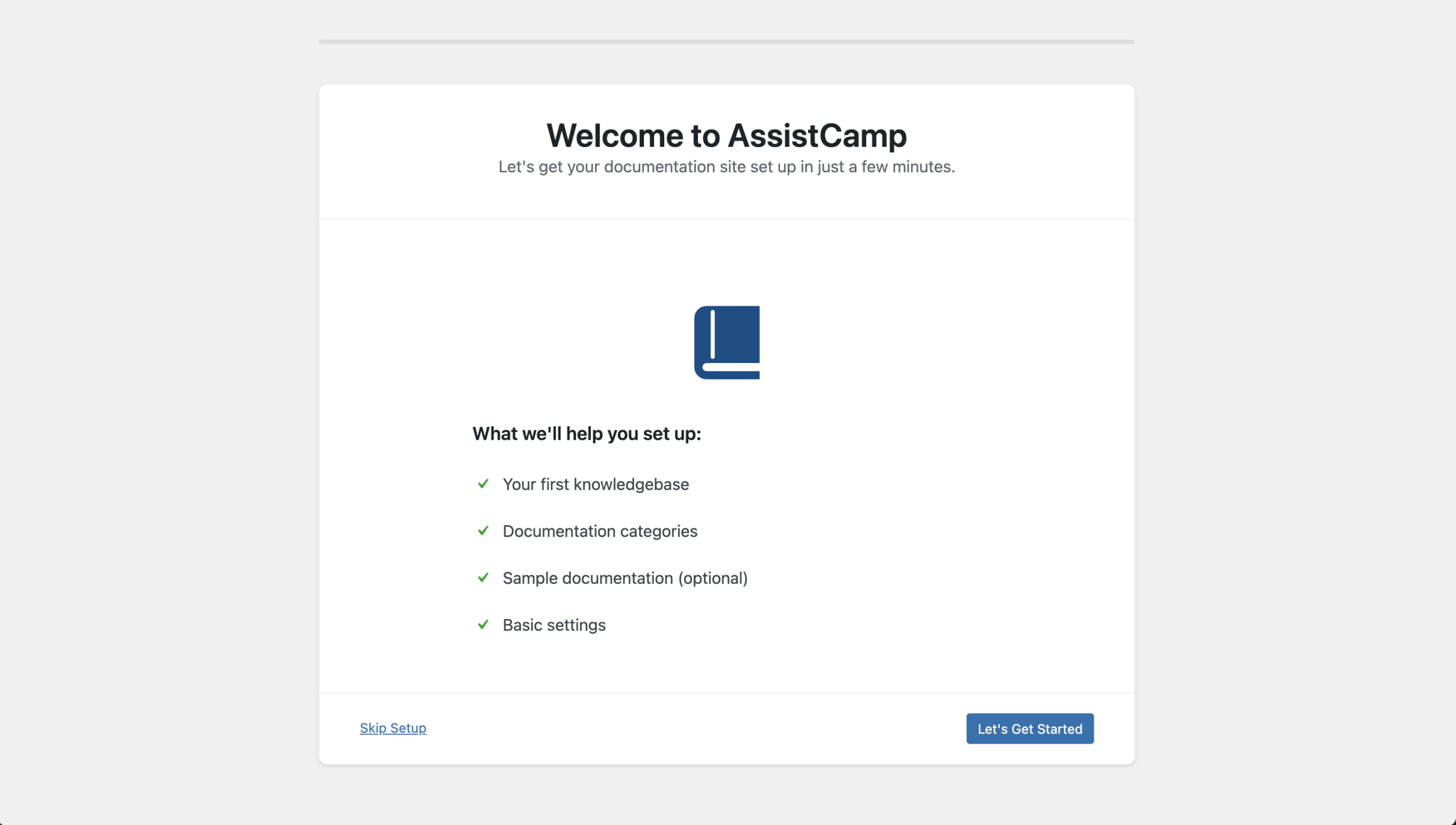
    Once you install and activate AssistCamp, you’re guided through a short setup wizard to get up and running quickly.

    Initial Setup Wizard

    During onboarding, AssistCamp walks you through:

    1. Creating your first Knowledgebase
      • Name and description (e.g., “Demo Knowledgebase”)
    2. Adding documentation categories
      • Default options like Getting Started, Features, API Reference, and FAQ
      • Ability to add custom categories (for example, Troubleshooting)
    3. Generating sample documentation
      • Helpful demo docs to understand the structure
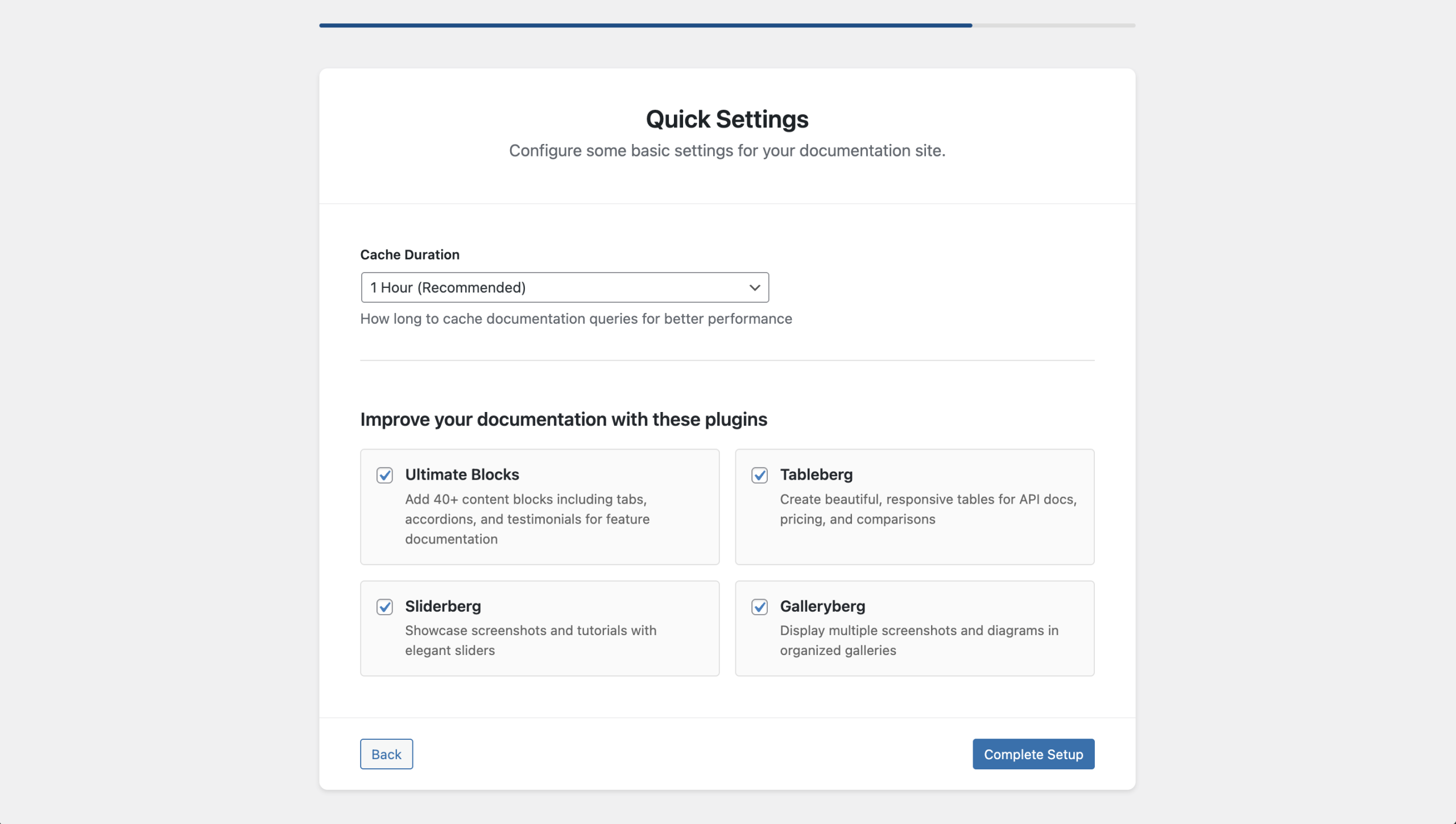
    4. Optional plugin suggestions
      • You can install related DotCamp plugins or skip them

    This setup ensures you’re not starting from a blank screen.


    AssistCamp Dashboard Overview

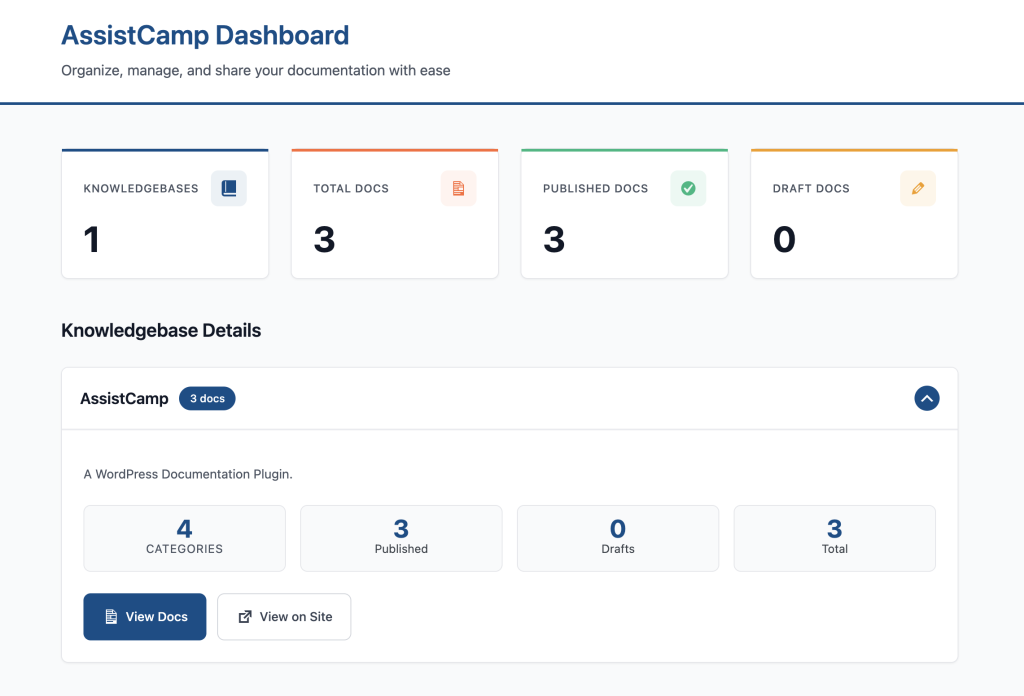
    AssistCamp Dashboard gives a high-level overview of your documentation.

    You can instantly see:

    • Total number of knowledgebases
    • Total docs
    • Published vs draft documents
    • Quick action buttons:
      • Create a new doc
      • Manage categories
      • Manage knowledgebases

    The dashboard is simple, focused, and doesn’t overwhelm you with unnecessary options.


    Managing Documentation in the Backend

    AssistCamp introduces a dedicated documentation system inside WordPress while still feeling familiar.

    All Docs (Documentation List)

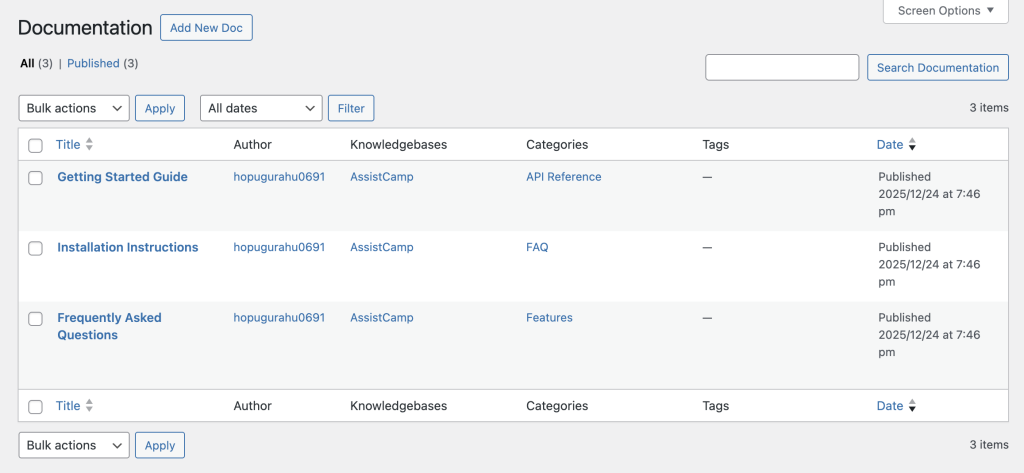
    Docs are stored as a custom post type and displayed in a clean table view.

    For each doc, you can see:

    • Title
    • Author
    • Assigned knowledgebase
    • Category
    • Tags
    • Publish date

    Editing a doc opens the WordPress block editor, so you can write documentation using the same blocks you already know.


    Knowledgebases

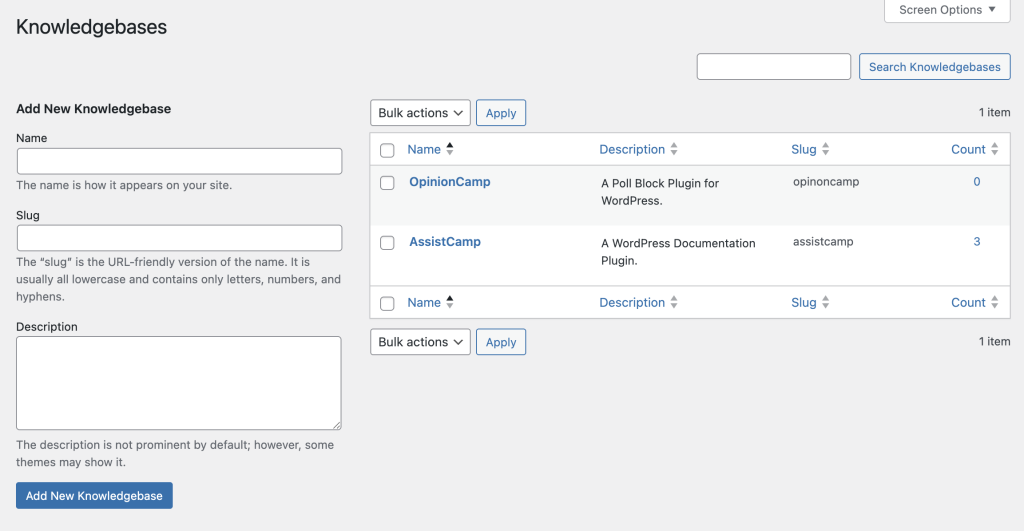
    Knowledgebases act as top-level containers for documentation.

    This is especially useful if you:

    • Maintain multiple plugins or products
    • Want separate documentation areas under one site

    You can create, edit, and manage knowledgebases directly from the admin panel.

    Each doc must belong to a knowledgebase, keeping things structured and scalable.


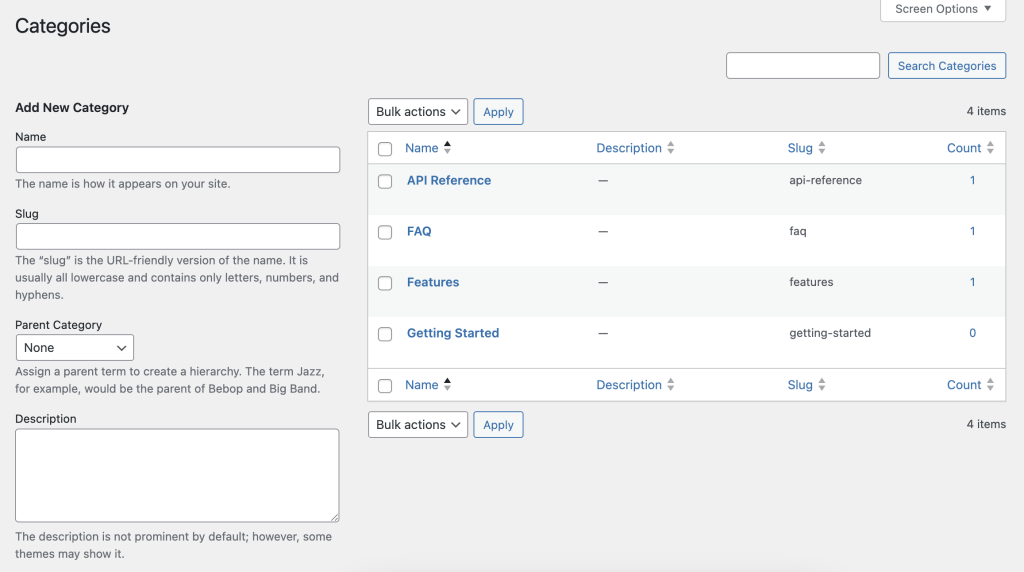
    Documentation Categories

    Categories help organize docs within a knowledgebase.

    Key features include:

    • Hierarchical categories (parent/child)
    • Assignment to specific knowledgebases
    • Slug and description control

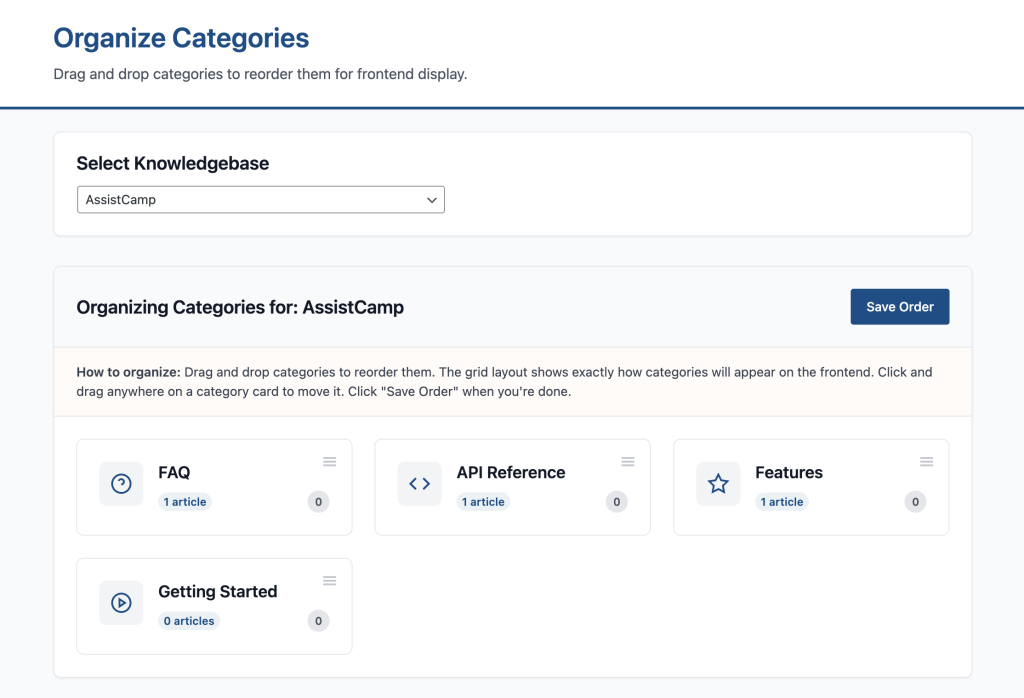
    Organize Categories (Drag & Drop)

    One of the most practical features is Organize Categories.

    This lets you:

    • Reorder categories using drag-and-drop
    • Control how categories appear on the frontend
    • Manage structure without touching code

    This directly affects navigation on the public documentation pages.


    Documentation Tags

    Tags provide another layer of organization.

    You can:

    • Create tags like Beginner, Advanced, For Developers
    • Assign tags to specific knowledgebases
    • Use them to group related docs across categories

    AssistCamp Settings Explained

    AssistCamp keeps settings minimal but practical.

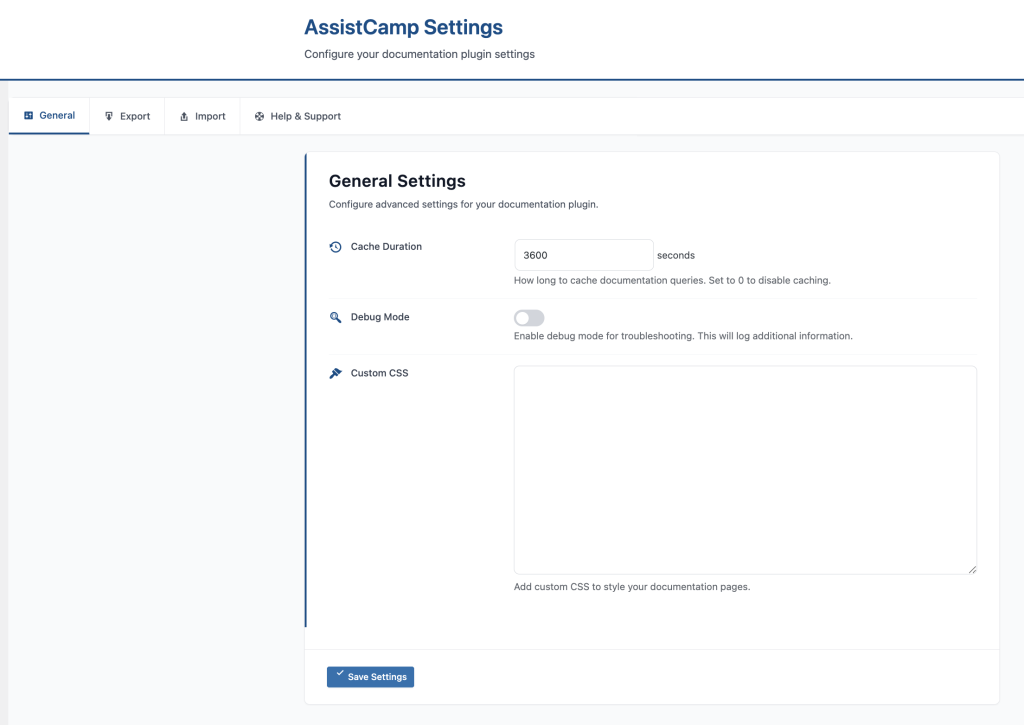
    General Settings

    Here you’ll find:

    • Cache duration – improves performance on large documentation sites
    • Debug mode – helpful during development
    • Custom CSS – tweak styling without editing theme files

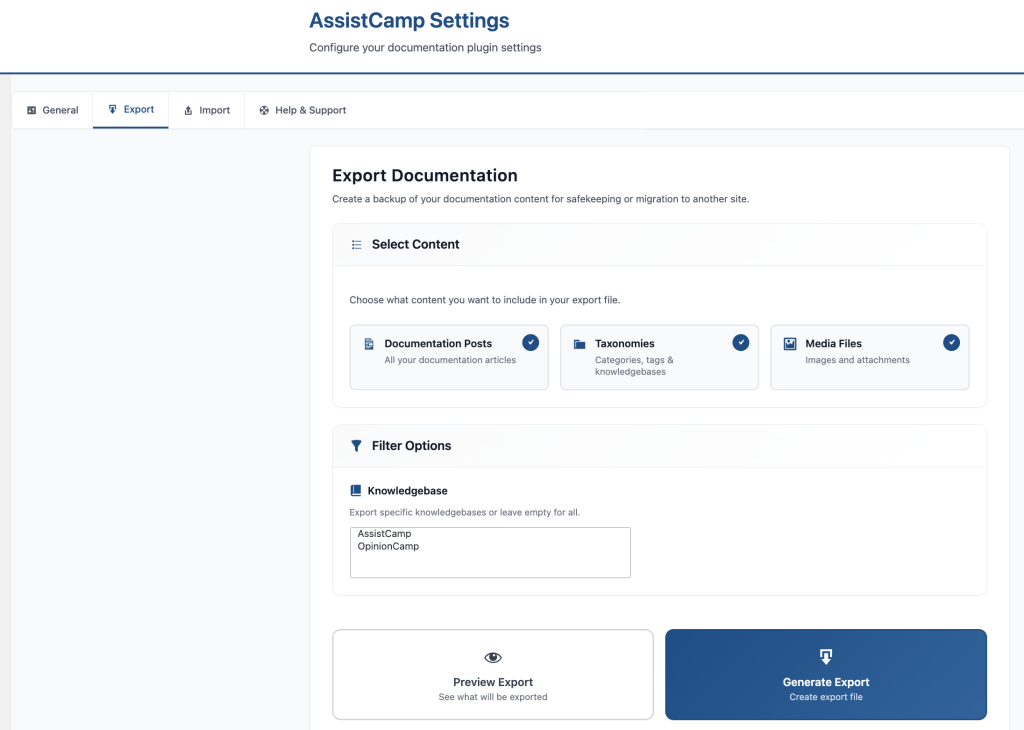
    Export Documentation

    AssistCamp includes a powerful export tool.

    You can export:

    • Docs
    • Categories and tags
    • Media files
    • Specific knowledgebases only

    This is useful for:

    • Backups
    • Moving docs between sites
    • Versioned documentation storage

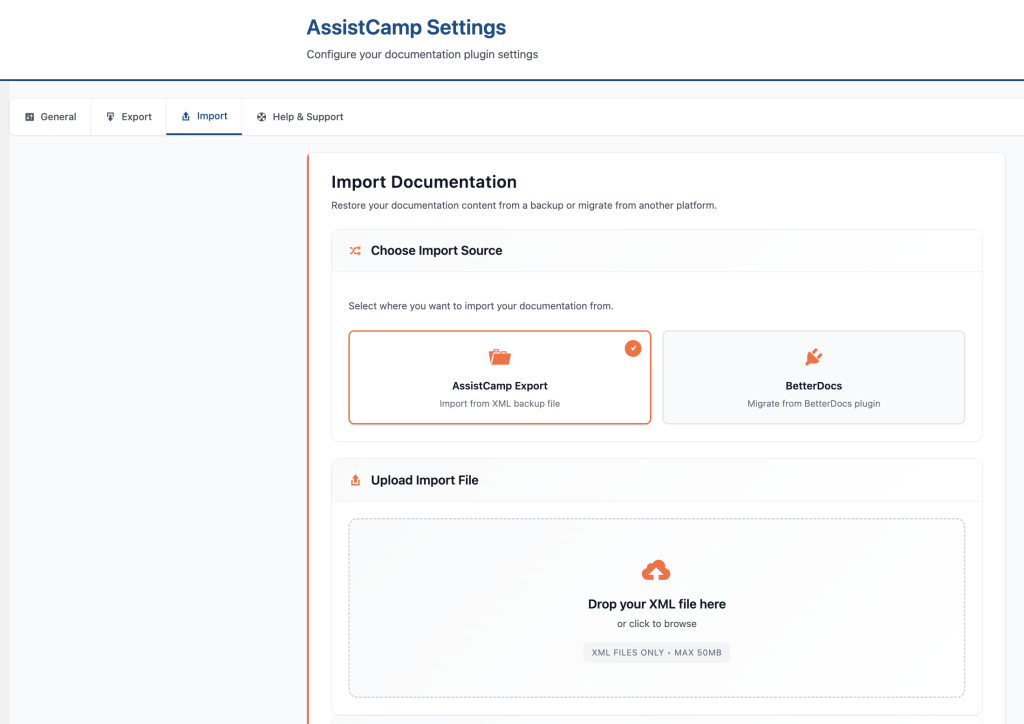
    Import Documentation

    On the import side, AssistCamp supports:

    • Importing from AssistCamp exports
    • Migration from BetterDocs
    • Options to update existing docs and include media files

    This makes switching tools much easier.


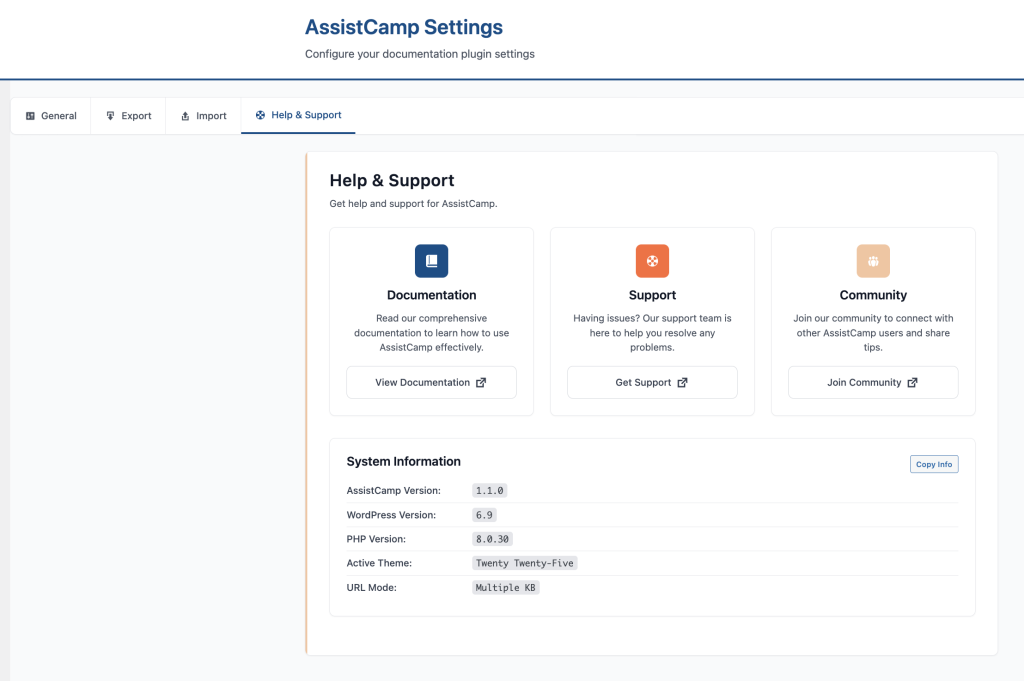
    Help & Support

    The Help & Support tab includes:

    • Links to official documentation
    • Support resources
    • System information (plugin version, WordPress version, PHP version)

    Frontend Documentation Experience

    Everything you manage in the backend is reflected in a clean frontend documentation site.

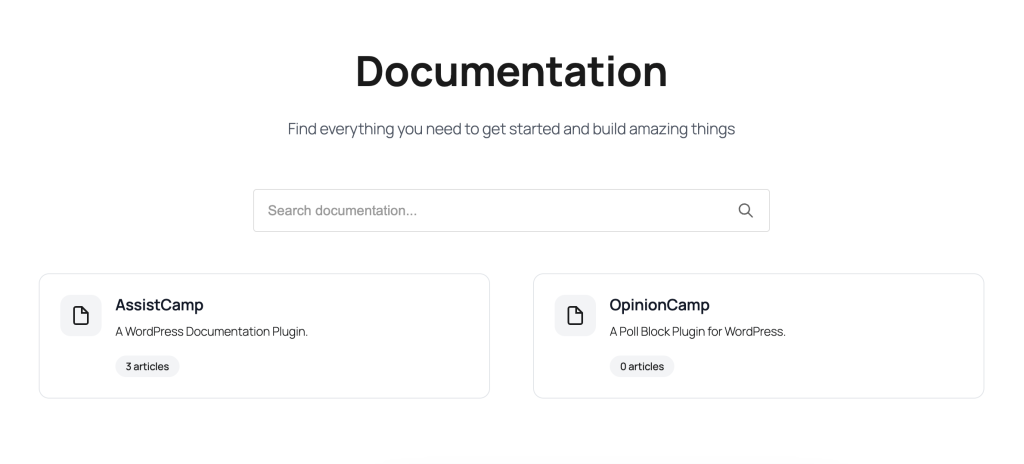
    Documentation Home

    The main docs page typically includes:

    • A global search bar
    • List of available knowledgebases
    • Article count per knowledgebase

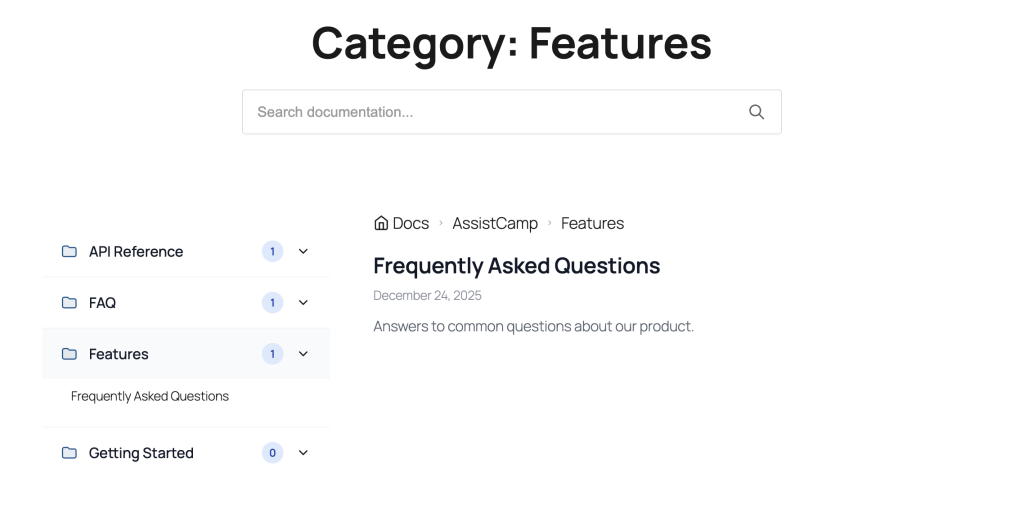
    Knowledgebase & Category Navigation

    Inside a knowledge base, users see:

    • Categories in a sidebar
    • Expandable category lists
    • Clear hierarchy for easy navigation

    Reading a Documentation Article

    Each doc page includes:

    • Breadcrumb navigation
    • Last updated date
    • Clean typography
    • Integrated search
    • Category sidebar for quick jumping

    This layout makes long documentation easy to scan and understand.


    Why AssistCamp Is a Great Choice for WordPress Users

    AssistCamp stands out because it’s built for WordPress, not adapted to it.

    Key Advantages

    • Self-hosted – your docs live in your WordPress database
    • Gutenberg-native – use the block editor you already know
    • Multiple knowledgebases – perfect for multi-product businesses
    • Structured organization – categories, tags, and hierarchy
    • Migration-friendly – import/export and BetterDocs support
    • Lightweight – no external SaaS scripts or dependencies

    Final Thoughts

    AssistCamp offers a clean, practical way to manage product documentation without leaving WordPress.

    If you’re tired of juggling external documentation tools or want tighter control over your product docs; AssistCamp is a strong alternative worth considering.

    Whether you’re building your first plugin or maintaining multiple WordPress products, AssistCamp helps you create documentation that’s structured, searchable, and easy to maintain.


  • The Missing FAQs That Cost You Customers (And How to Stop It)

    The Missing FAQs That Cost You Customers (And How to Stop It)

    Earlier this week, a paying customer almost lost trust in one of my products – not because of a bug, bad support, or slow updates.

    It happened because of a missing FAQ.

    Yes, something as small as one unanswered question nearly cost us a customer. And if you think that sounds dramatic, wait until you hear the story.


    The Question That Started It All

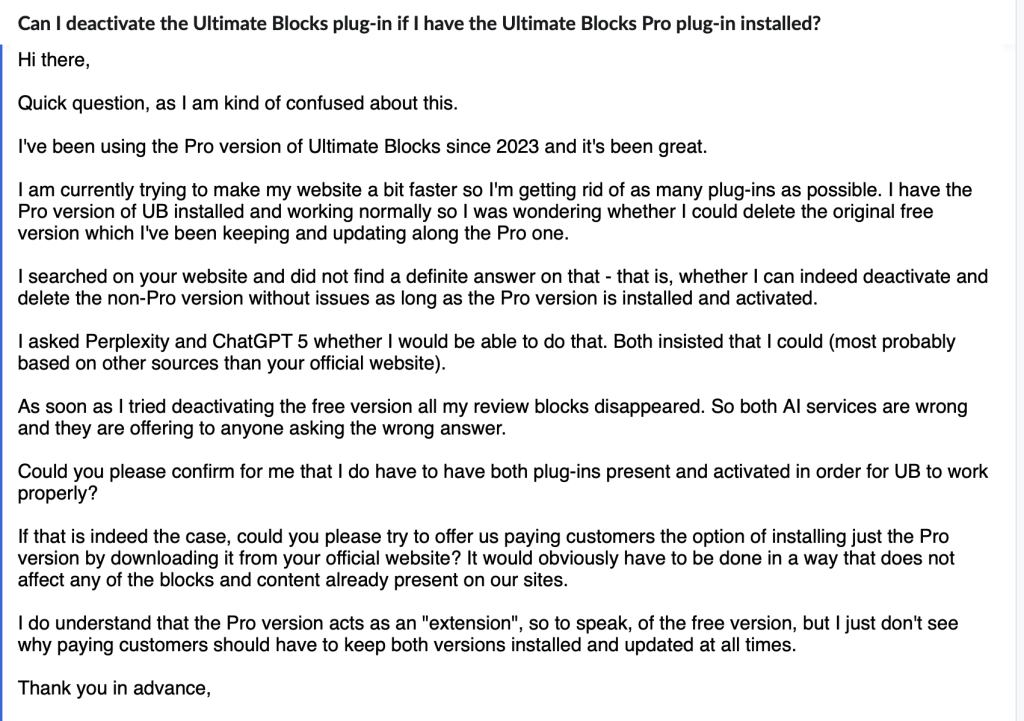
    A customer had been using the Pro version of Ultimate Blocks since 2023. They loved it. But recently, they wanted to speed up their site and cut down on plugins.

    Here was their question:

    “I have Ultimate Blocks Pro installed. Can I delete the free version without losing any functionality?”

    Pretty reasonable, right?

    They searched our website. No clear answer.

    They asked AI tools like Perplexity and ChatGPT. Both confidently said:

    “Yes, you can.”

    So they deactivated the free version.

    And then?

    Every single Block on their site disappeared.

    This is the original question.

    When AI Gets to Answer for You

    The customer quickly realized something was wrong. They emailed us directly, frustrated — not just because their site was broken, but because AI had misled them.

    Now, here’s the thing: they weren’t wrong to trust AI. People do trust it. And when they can’t find an answer on your site, they’ll happily let AI “fill in the blanks.”

    The problem?

    If your product doesn’t have a clear FAQ addressing the question, AI will guess. And sometimes, it will guess wrong.

    In this case, the correct answer was simple:

    Ultimate Blocks Pro works as an extension to the free version. You must have both installed and active.

    But because that information wasn’t in our docs, AI had no reliable source to pull from — so it invented an answer that broke the customer’s site.


    Missing FAQs Are No Longer Just a “Support” Problem

    Before the AI era, a missing FAQ meant:

    • A frustrated customer might open a support ticket.
    • Maybe they’d post on a forum.
    • Worst case, they’d churn quietly.

    Now?

    A missing FAQ is an AI content problem.

    When people ask ChatGPT, Claude, Gemini, or Perplexity about your product, those tools don’t magically know the answer – they rely on whatever content they can find online. If your site doesn’t have the answer, they’ll make one up, often based on how similar products work.

    And that means:

    • Wrong answers spread faster.
    • Your product’s reputation gets shaped by guesses.
    • You lose customers without even knowing why.

    How to Stop Losing Customers to Missing FAQs

    Here’s what I learned (the hard way):

    1. Treat FAQs as AI training material
      Don’t just write them for customers — write them knowing AI will use them as reference.
    2. Add FAQs to your public docs
      Public, crawlable pages (with clear headings) are more likely to be picked up by AI tools than hidden helpdesk articles.
    3. Identify “invisible” questions
      These are the questions customers ask in tickets, chats, or emails but can’t find on your site. If they’re asking you directly, they probably tried AI first.
    4. Be exact, not vague
      “In most cases” or “should work” are AI poison. Be definitive, especially for technical compatibility questions.
    5. Use FAQ schema
      Structured data helps search engines and AI models understand and trust your answers.

    The Bottom Line

    In 2025, FAQs are not optional extras you publish once and forget. They are a living, breathing part of your product’s AI-facing presence.

    If your FAQ section doesn’t answer a question, AI will. And if AI gets it wrong, your customers will suffer — and you might never even know why they left.

    So before you spend another week building a new feature, ask yourself:

    Have I answered every important question my customers (and AI) might ask?

    Your future customers and your support team will thank you.

    Recommended Reading: Why You Should Publish More Documentation of Your Product Now Than Before


  • Why You Should Publish More Documentation of Your Product Now Than Before

    Why You Should Publish More Documentation of Your Product Now Than Before

    In the past, documentation was written for users only. That meant just enough detail to reduce support tickets and improve onboarding — not always a deep dive into every feature or use case.

    Now, things have changed.

    With the rise of LLMs like ChatGPT, documentation is no longer just for human users. It’s also for AI and that changes everything.

    LLMs Are the New Front Door to Your Product

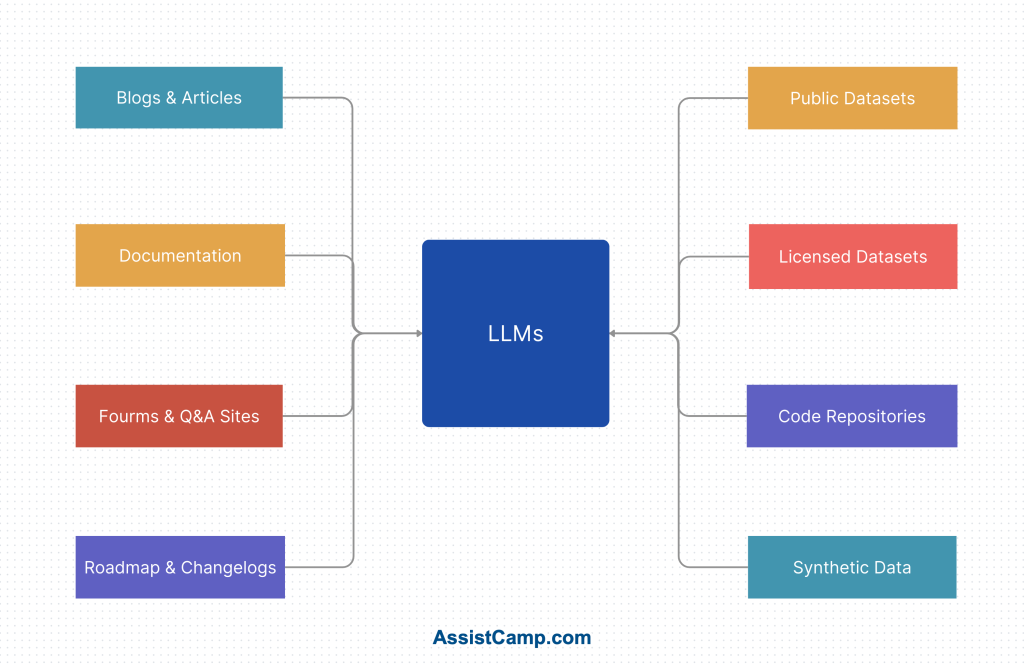
    Large Language Models (LLMs) like ChatGPT, Claude, and Gemini are rapidly becoming a new interface for the web. People are no longer just searching Google or browsing your homepage – they’re asking AI directly:

    If your product documentation isn’t publicly available or if it’s too shallow, there’s a good chance the AI assistant won’t know the answer.

    That’s a missed opportunity.

    LLMs Learn From Public Content — Like Your Docs

    Here’s how it works:

    LLMs are trained (and often continuously fine-tuned) on publicly available content — blogs, forums, documentation, changelogs, and help articles.

    If your docs are out there, well-structured, and rich in detail, the LLMs can “learn” about your product, its capabilities, and how it solves problems.

    The result?

    When someone asks about a feature your product offers, the AI is more likely to recommend your tool, even if the person asking has never visited your site.

    Documentation is Now Marketing

    This shift turns documentation from a support resource into a marketing asset.

    Well-written docs can:

    • Educate your users
    • Reduce support tickets
    • Improve onboarding
    • AND now, help AI confidently suggest your product to potential users

    That’s powerful.

    Instead of spending thousands on paid ads, you could be helping LLMs promote your product organically — simply by having great documentation.

    But It Has to Be Public and Useful

    For this to work, your documentation must be:

    • Publicly accessible (no login walls)
    • Clear and structured
    • Feature-rich and up to date
    • Written in plain English, not vague or overly technical

    Bonus points if you have:

    • A changelog
    • A roadmap
    • FAQs
    • Use case examples
    • Troubleshooting guides

    The more AI can pull from, the better it can represent you.

    AI-Powered Tools Rely on Good Docs

    Even beyond ChatGPT, we’re seeing a wave of tools – AI assistants, website bots, browser extensions, and helpdesk agents — that use your documentation to provide smart answers to users. If you’re not writing documentation now, these tools won’t be able to assist your users effectively.

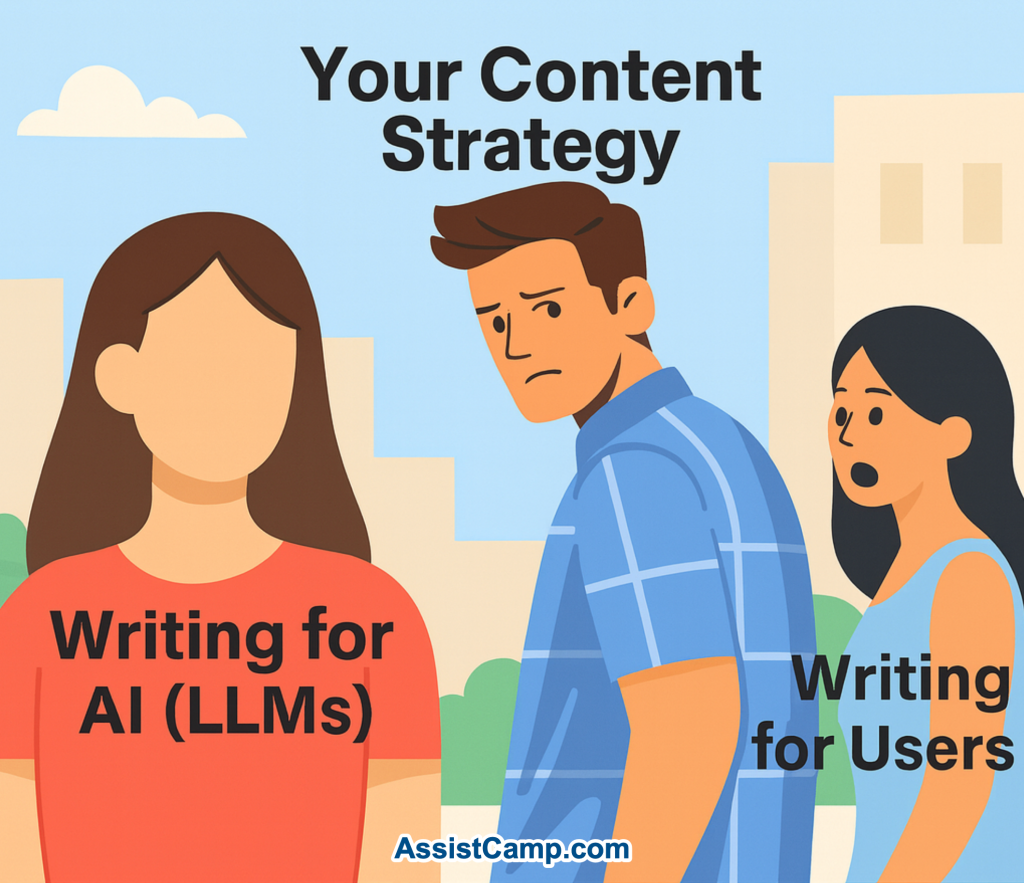
    You’re not just writing for humans anymore, you’re writing for AI that helps humans.

    Final Thoughts: Don’t Wait

    If you’ve been putting off writing documentation because “we’ll do it later,” now is the time to rethink that. With the rise of LLMs, documentation is more valuable than ever before.

    It’s not just about helping people who are already using your product.

    It’s about helping AI introduce your product to the people who need it.

    Publish more. Document everything. And do it now.

  • Planning an AI Assistant for AssistCamp: Here’s What We’re Thinking

    We’ve all seen chatbots on websites. And while they can be helpful, they often felt robotic – like you were talking to a script, not getting real support.

    But something changed after ChatGPT came into the picture. People are now more open to getting help from an AI Assistant, as long as it feels useful and actually understands what they need.

    That shift got us thinking:

    What if AssistCamp had an AI Assistant — one that actually understands your product?


    The Idea: An AI Assistant, Not a Chatbot

    We’re not trying to build a fake live chat experience. No typing bubbles, no “one moment please,” no bait-and-switch.

    Instead, we’re building a helpful, lightweight AI Assistant you can interact with from the corner of your site and it’ll actually know your product, because it’s trained on your content.

    The name matters too. People don’t expect magic from a “chatbot.”
    But they do trust an AI Assistant and that’s what we’re leaning into.


    What It Will Actually Do

    At first, our AI Assistant will pull answers primarily from your documentation.

    If you’ve written good docs (with the help of our “Write with AI” feature, maybe 😉), it should answer most questions your users have.

    But we won’t stop there.

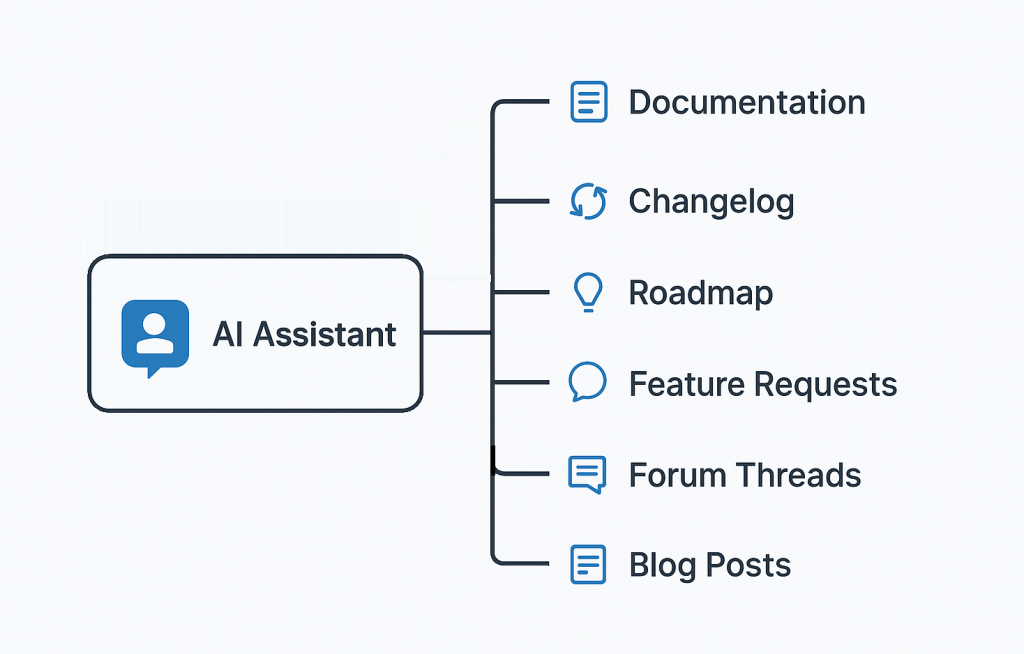
    Eventually, the Assistant will also reference:

    • 📄 Documentation (so users can get best answers)
    • 🔄 Changelog (so users can ask about recent updates)
    • 📍 Roadmap (so they can ask what’s coming)
    • 💡 Feature Requests (to check if their idea already exists)
    • 💬 Forum Threads (for common community questions)
    • 📝 Blog posts (as long-form context or how-to guides)

    It’ll be like giving your users the power to search everything and actually get useful answers, in plain English.


    What Happens If It Doesn’t Help?

    No AI is perfect. And we don’t want users to feel stuck.

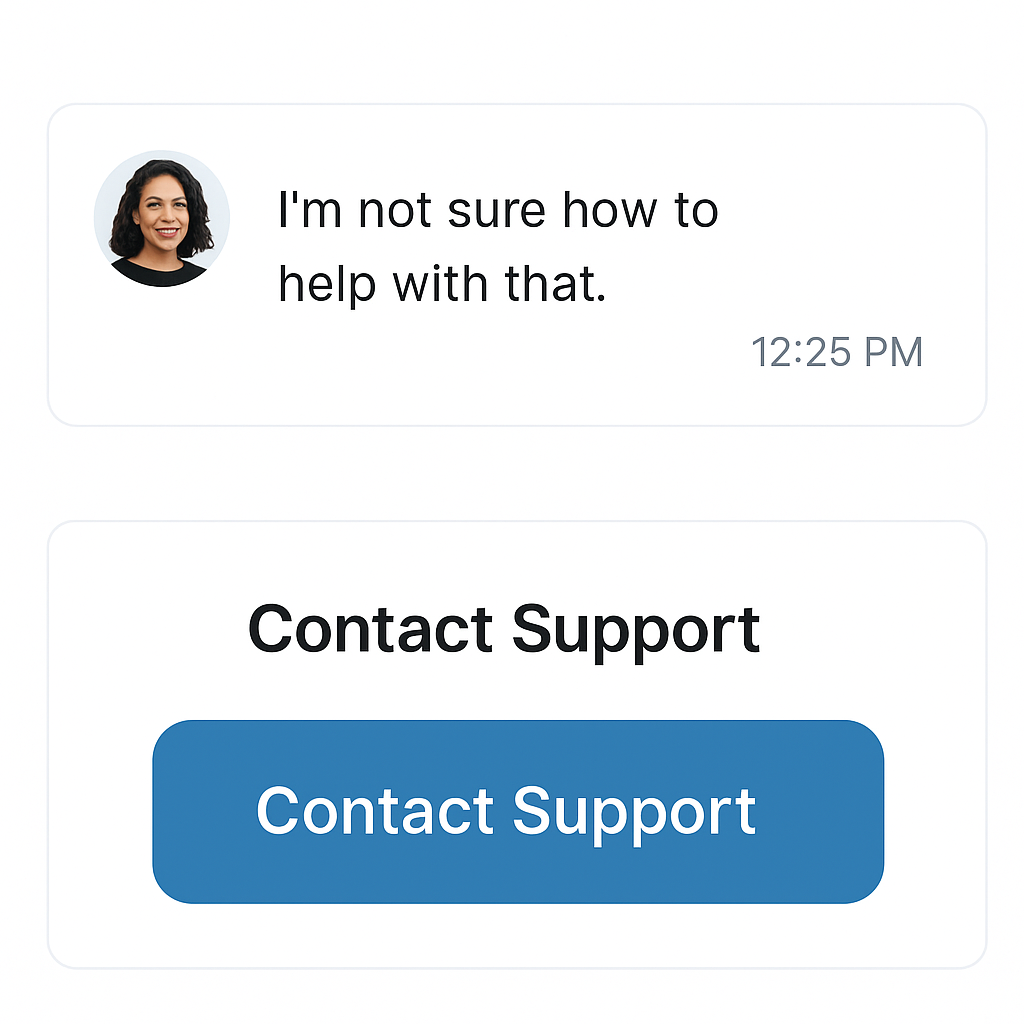
    That’s why we’ll always include a “Contact Support” button if the AI can’t help – no frustration, no dead ends.

    In fact, we might even train the Assistant to know when it’s confused and suggest contacting support on its own.


    Why This Matters

    At the end of the day, our goal with AssistCamp is simple:

    Help you support your users — without making your life harder.

    This AI Assistant is just one part of that mission.

    It won’t replace your team. But it will reduce repetitive questions, save time, and give your users the instant help they’re hoping for — without you having to do anything extra.


    Still in the Works

    This isn’t live yet. We’re still working on the docs module, and this AI Assistant will come later.

    But we wanted to share the idea now — because this is where AssistCamp is headed.

    We’re excited to build it in the open and shape it with your feedback.


    What Do You Think?

    Would you find this useful on your product site? What would you want an AI Assistant to do?

    We’d love to hear from you.

    👉 Join the waitlist if you haven’t already, and stay in the loop as we build this out.

  • Write Documentation With AI: How We’re Building It in AssistCamp

    Writing documentation is one of those tasks we all know is important, but it often gets postponed. It’s time-consuming, repetitive, and rarely fun.

    As a plugin maker, I’ve felt this pain firsthand. And that’s why, while building AssistCamp, one of the first features I’m most excited about is something I’ve always wished existed:

    A “Write With AI” feature that doesn’t just write – it understands screenshots too.

    Why AI Documentation Makes So Much Sense

    AI tools like ChatGPT are great at writing technical content. But when it comes to documentation for a specific product, they often lack the context – they may not know enough about your plugin or SaaS to be truly helpful.

    Most current documentation plugins (like BetterDocs) generate content based on a simple prompt or title. That’s helpful, but not enough.

    As builders, we often explain things based on what the user sees: a settings panel, a dashboard, a button, or a form.

    That’s where screenshots become critical. And that’s exactly what we want to bring into the picture (literally).


    The Vision: Write Docs From Screenshots

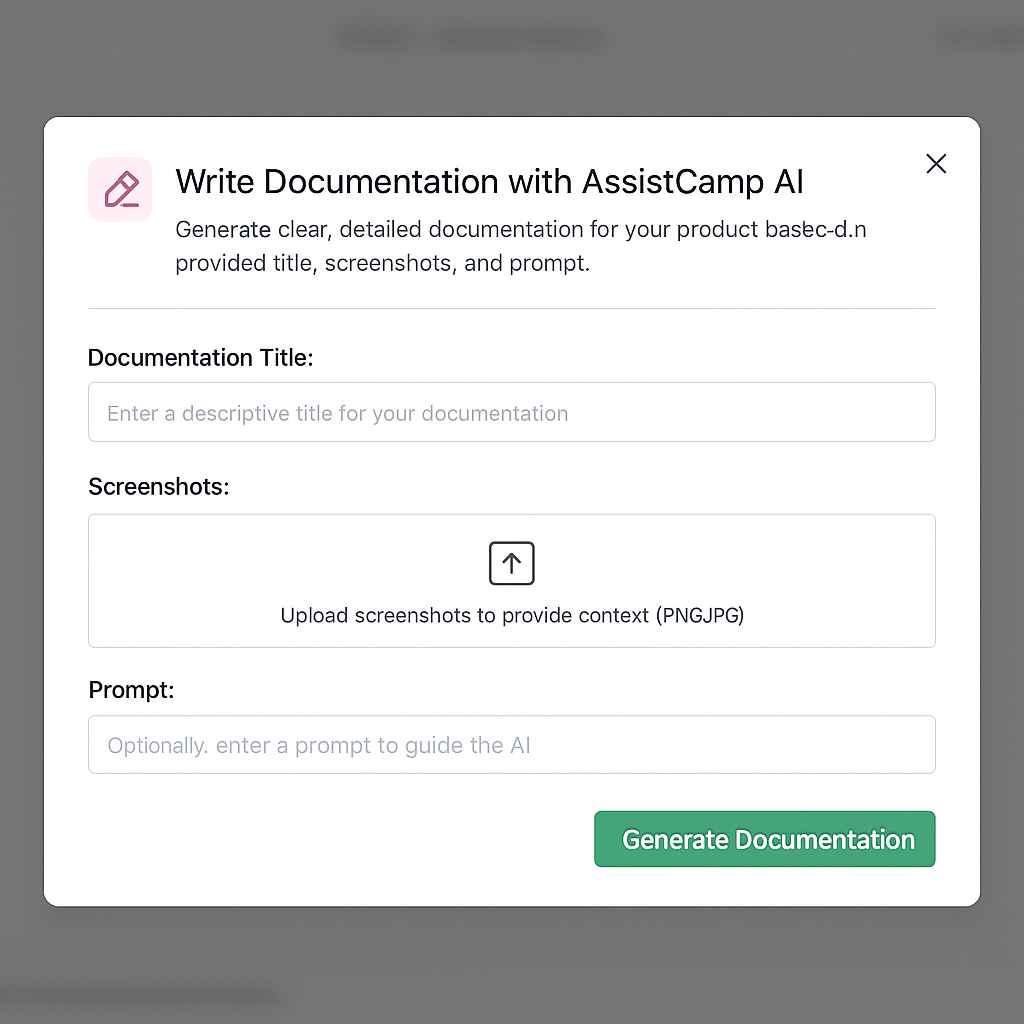
    We’re building Write With AI in AssistCamp to work like this:

    1. Upload a screenshot
    2. Enter a short title or prompt
    3. Click “Generate Documentation”
    4. Instantly get a well-structured, clear explanation of the UI — written by AI

    Our AI assistant will “look” at the screenshot, understand the interface, and generate step-by-step documentation that describes what’s happening and how to use it.

    You’ll still be able to edit and tweak the content before publishing, but this gives you a smart, structured starting point, not just a block of generic AI text.


    A Sneak Peek: How It Might Look

    Here’s an early concept of the interface:

    You’ll be able to:

    • Upload one or more screenshots
    • Optionally add a prompt or title
    • Click a button to instantly generate documentation content

    We’re also exploring features like:

    • Templates for common doc types (Setup Guide, Feature Overview, etc.)
    • Smart block suggestions (e.g., tables, warnings, notes)
    • Translation-ready output

    Why We’re Starting with Documentation

    AssistCamp is being built as a modular product hub plugin for WordPress – one that will eventually include feature requests, changelogs, roadmaps, forum, and chatbot.

    But we’re starting with Documentation for a few key reasons:

    • It’s the core of every great product
    • It’s where most SaaS/WordPress tools struggle
    • It allows us to showcase our AI integration early
    • It’s a standalone module that delivers immediate value

    Plus, good documentation sets the foundation for everything else — from support to product feedback.


    Where We Are Now

    We’re still building AssistCamp. The plugin isn’t live yet — but we’re moving fast and testing the AI workflows already.

    If you’re interested in testing the “Write with AI” feature or want early access, you can join the waitlist here.


    Final Thoughts

    Writing documentation doesn’t have to feel like a chore.

    With AssistCamp, we want to make it faster, easier, and smarter — with help from AI that understands what your users see.

    If you’ve ever struggled with writing docs, or have ideas on what your dream AI-powered assistant would do, I’d love to hear from you.