Category: AI & Documentation

  • The Missing FAQs That Cost You Customers (And How to Stop It)

    The Missing FAQs That Cost You Customers (And How to Stop It)

    Earlier this week, a paying customer almost lost trust in one of my products – not because of a bug, bad support, or slow updates.

    It happened because of a missing FAQ.

    Yes, something as small as one unanswered question nearly cost us a customer. And if you think that sounds dramatic, wait until you hear the story.


    The Question That Started It All

    A customer had been using the Pro version of Ultimate Blocks since 2023. They loved it. But recently, they wanted to speed up their site and cut down on plugins.

    Here was their question:

    “I have Ultimate Blocks Pro installed. Can I delete the free version without losing any functionality?”

    Pretty reasonable, right?

    They searched our website. No clear answer.

    They asked AI tools like Perplexity and ChatGPT. Both confidently said:

    “Yes, you can.”

    So they deactivated the free version.

    And then?

    Every single Block on their site disappeared.
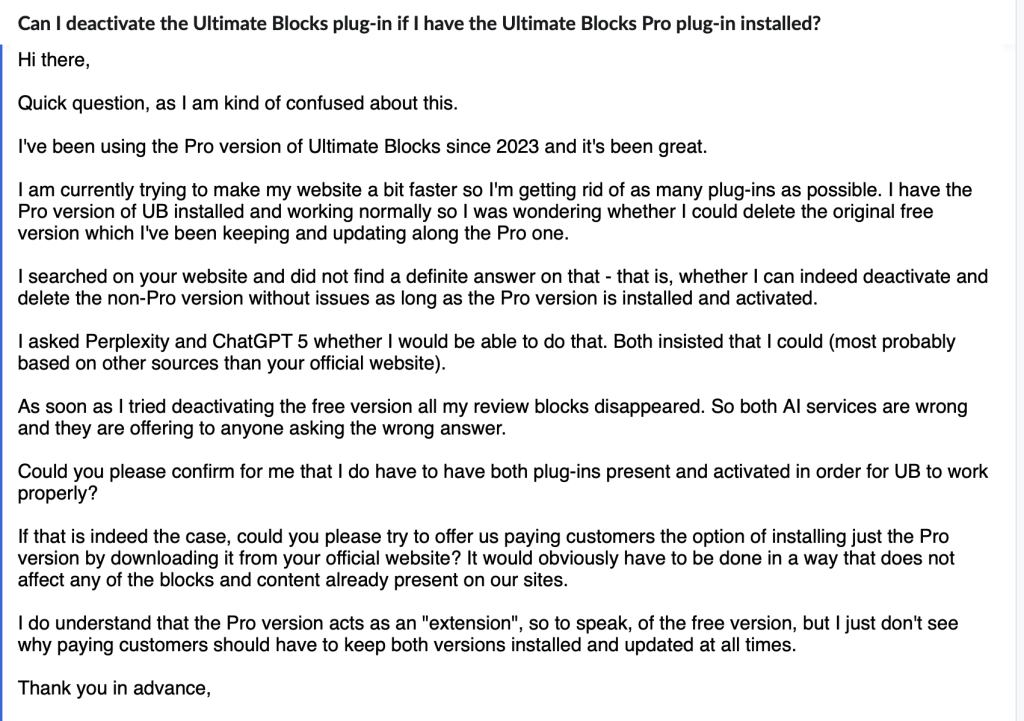
    This is the original question.

    When AI Gets to Answer for You

    The customer quickly realized something was wrong. They emailed us directly, frustrated — not just because their site was broken, but because AI had misled them.

    Now, here’s the thing: they weren’t wrong to trust AI. People do trust it. And when they can’t find an answer on your site, they’ll happily let AI “fill in the blanks.”

    The problem?

    If your product doesn’t have a clear FAQ addressing the question, AI will guess. And sometimes, it will guess wrong.

    In this case, the correct answer was simple:

    Ultimate Blocks Pro works as an extension to the free version. You must have both installed and active.

    But because that information wasn’t in our docs, AI had no reliable source to pull from — so it invented an answer that broke the customer’s site.


    Missing FAQs Are No Longer Just a “Support” Problem

    Before the AI era, a missing FAQ meant:

    • A frustrated customer might open a support ticket.
    • Maybe they’d post on a forum.
    • Worst case, they’d churn quietly.

    Now?

    A missing FAQ is an AI content problem.

    When people ask ChatGPT, Claude, Gemini, or Perplexity about your product, those tools don’t magically know the answer – they rely on whatever content they can find online. If your site doesn’t have the answer, they’ll make one up, often based on how similar products work.

    And that means:

    • Wrong answers spread faster.
    • Your product’s reputation gets shaped by guesses.
    • You lose customers without even knowing why.

    How to Stop Losing Customers to Missing FAQs

    Here’s what I learned (the hard way):

    1. Treat FAQs as AI training material
      Don’t just write them for customers — write them knowing AI will use them as reference.
    2. Add FAQs to your public docs
      Public, crawlable pages (with clear headings) are more likely to be picked up by AI tools than hidden helpdesk articles.
    3. Identify “invisible” questions
      These are the questions customers ask in tickets, chats, or emails but can’t find on your site. If they’re asking you directly, they probably tried AI first.
    4. Be exact, not vague
      “In most cases” or “should work” are AI poison. Be definitive, especially for technical compatibility questions.
    5. Use FAQ schema
      Structured data helps search engines and AI models understand and trust your answers.

    The Bottom Line

    In 2025, FAQs are not optional extras you publish once and forget. They are a living, breathing part of your product’s AI-facing presence.

    If your FAQ section doesn’t answer a question, AI will. And if AI gets it wrong, your customers will suffer — and you might never even know why they left.

    So before you spend another week building a new feature, ask yourself:

    Have I answered every important question my customers (and AI) might ask?

    Your future customers and your support team will thank you.

    Recommended Reading: Why You Should Publish More Documentation of Your Product Now Than Before


  • Why You Should Publish More Documentation of Your Product Now Than Before
    Why You Should Publish More Documentation of Your Product Now Than Before
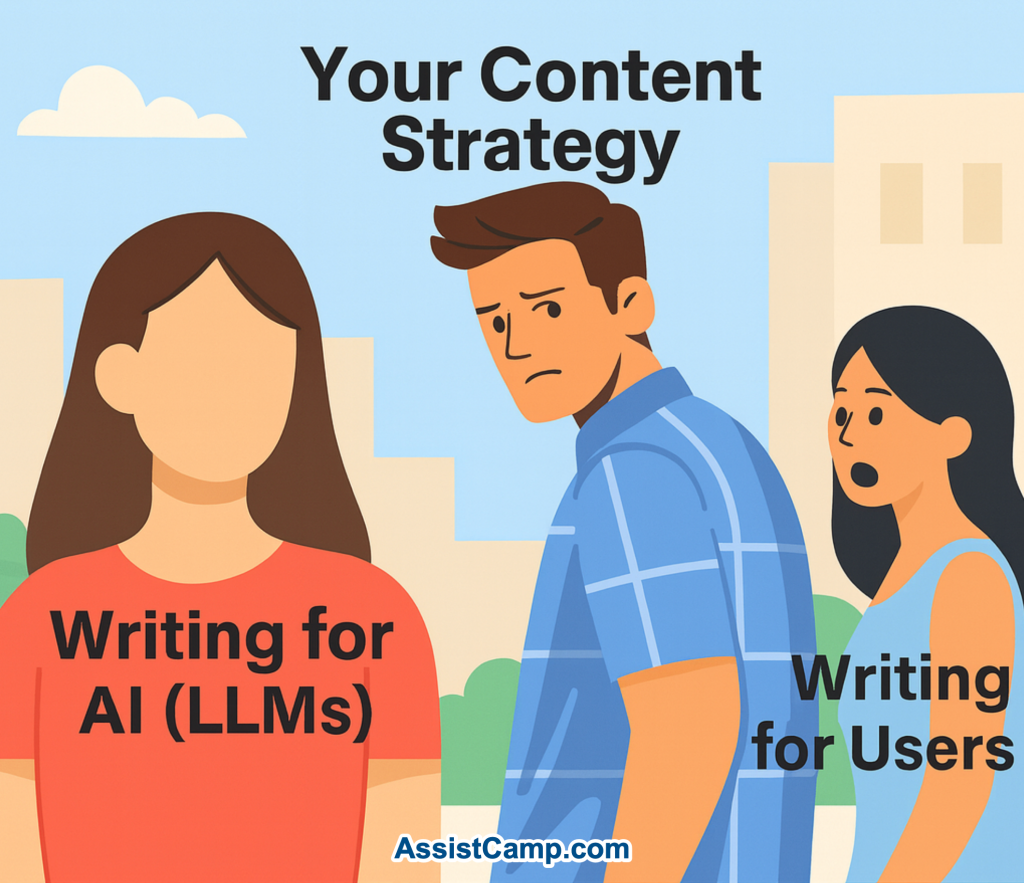
    In the past, documentation was written for users only. That meant just enough detail to reduce support tickets and improve onboarding — not always a deep dive into every feature or use case.

    Now, things have changed.

    With the rise of LLMs like ChatGPT, documentation is no longer just for human users. It’s also for AI and that changes everything.

    LLMs Are the New Front Door to Your Product

    Large Language Models (LLMs) like ChatGPT, Claude, and Gemini are rapidly becoming a new interface for the web. People are no longer just searching Google or browsing your homepage – they’re asking AI directly:

    If your product documentation isn’t publicly available or if it’s too shallow, there’s a good chance the AI assistant won’t know the answer.

    That’s a missed opportunity.

    LLMs Learn From Public Content — Like Your Docs

    Here’s how it works:

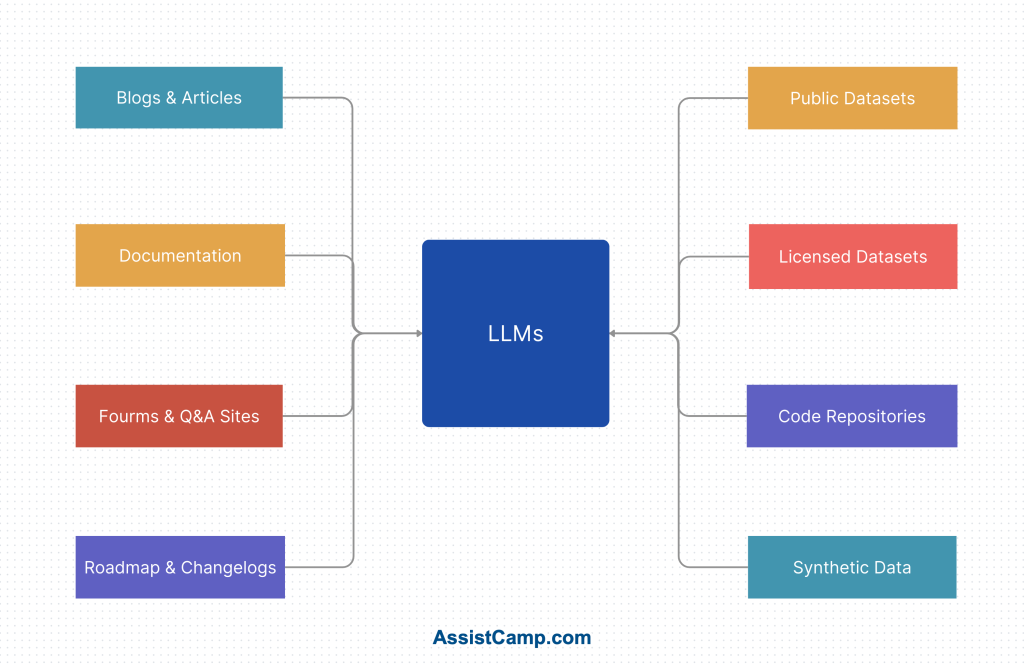
    LLMs are trained (and often continuously fine-tuned) on publicly available content — blogs, forums, documentation, changelogs, and help articles.

    If your docs are out there, well-structured, and rich in detail, the LLMs can “learn” about your product, its capabilities, and how it solves problems.

    The result?

    When someone asks about a feature your product offers, the AI is more likely to recommend your tool, even if the person asking has never visited your site.

    Documentation is Now Marketing

    This shift turns documentation from a support resource into a marketing asset.

    Well-written docs can:

    • Educate your users
    • Reduce support tickets
    • Improve onboarding
    • AND now, help AI confidently suggest your product to potential users

    That’s powerful.

    Instead of spending thousands on paid ads, you could be helping LLMs promote your product organically — simply by having great documentation.

    But It Has to Be Public and Useful

    For this to work, your documentation must be:

    • Publicly accessible (no login walls)
    • Clear and structured
    • Feature-rich and up to date
    • Written in plain English, not vague or overly technical

    Bonus points if you have:

    • A changelog
    • A roadmap
    • FAQs
    • Use case examples
    • Troubleshooting guides

    The more AI can pull from, the better it can represent you.

    AI-Powered Tools Rely on Good Docs

    Even beyond ChatGPT, we’re seeing a wave of tools – AI assistants, website bots, browser extensions, and helpdesk agents — that use your documentation to provide smart answers to users. If you’re not writing documentation now, these tools won’t be able to assist your users effectively.

    You’re not just writing for humans anymore, you’re writing for AI that helps humans.

    Final Thoughts: Don’t Wait

    If you’ve been putting off writing documentation because “we’ll do it later,” now is the time to rethink that. With the rise of LLMs, documentation is more valuable than ever before.

    It’s not just about helping people who are already using your product.

    It’s about helping AI introduce your product to the people who need it.

    Publish more. Document everything. And do it now.

  • Write Documentation With AI: How We’re Building It in AssistCamp

    Writing documentation is one of those tasks we all know is important, but it often gets postponed. It’s time-consuming, repetitive, and rarely fun.

    As a plugin maker, I’ve felt this pain firsthand. And that’s why, while building AssistCamp, one of the first features I’m most excited about is something I’ve always wished existed:

    A “Write With AI” feature that doesn’t just write – it understands screenshots too.

    Why AI Documentation Makes So Much Sense

    AI tools like ChatGPT are great at writing technical content. But when it comes to documentation for a specific product, they often lack the context – they may not know enough about your plugin or SaaS to be truly helpful.

    Most current documentation plugins (like BetterDocs) generate content based on a simple prompt or title. That’s helpful, but not enough.

    As builders, we often explain things based on what the user sees: a settings panel, a dashboard, a button, or a form.

    That’s where screenshots become critical. And that’s exactly what we want to bring into the picture (literally).


    The Vision: Write Docs From Screenshots

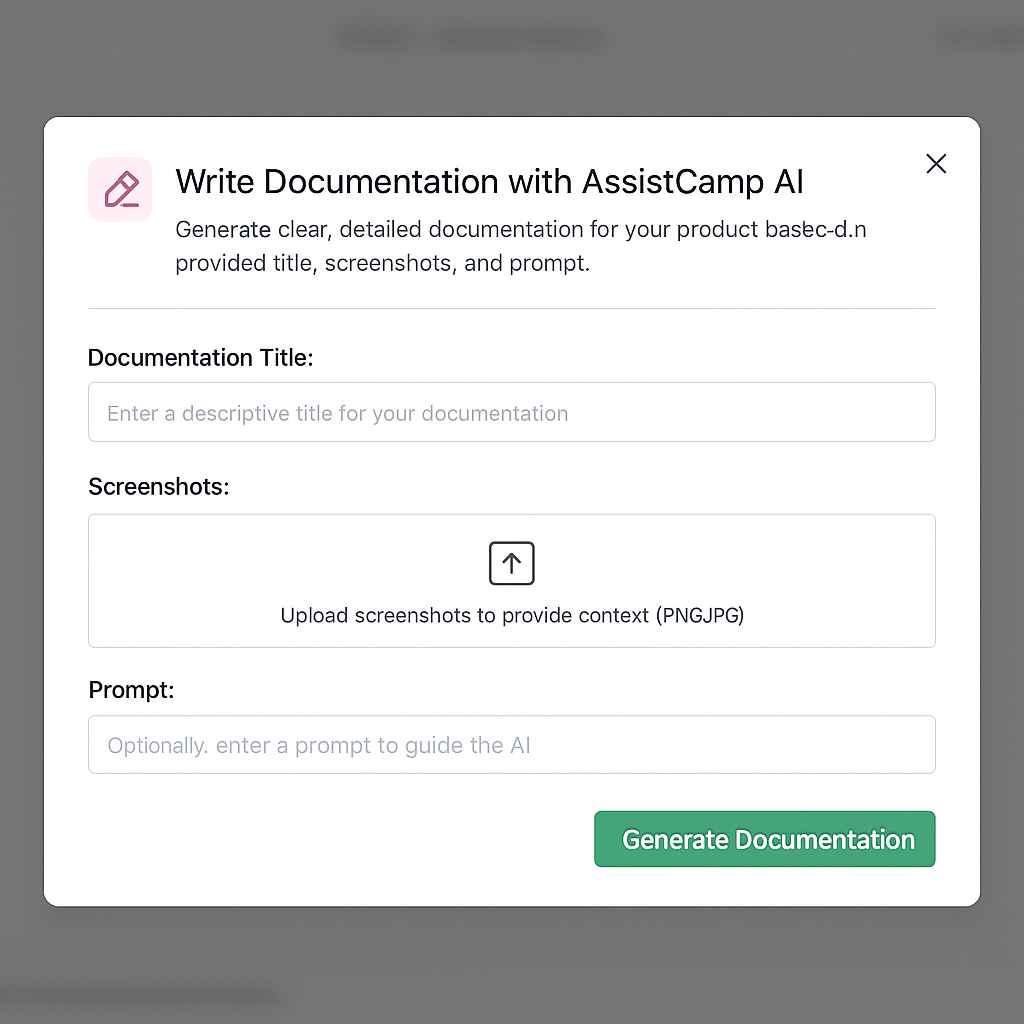
    We’re building Write With AI in AssistCamp to work like this:

    1. Upload a screenshot
    2. Enter a short title or prompt
    3. Click “Generate Documentation”
    4. Instantly get a well-structured, clear explanation of the UI — written by AI

    Our AI assistant will “look” at the screenshot, understand the interface, and generate step-by-step documentation that describes what’s happening and how to use it.

    You’ll still be able to edit and tweak the content before publishing, but this gives you a smart, structured starting point, not just a block of generic AI text.


    A Sneak Peek: How It Might Look

    Here’s an early concept of the interface:

    You’ll be able to:

    • Upload one or more screenshots
    • Optionally add a prompt or title
    • Click a button to instantly generate documentation content

    We’re also exploring features like:

    • Templates for common doc types (Setup Guide, Feature Overview, etc.)
    • Smart block suggestions (e.g., tables, warnings, notes)
    • Translation-ready output

    Why We’re Starting with Documentation

    AssistCamp is being built as a modular product hub plugin for WordPress – one that will eventually include feature requests, changelogs, roadmaps, forum, and chatbot.

    But we’re starting with Documentation for a few key reasons:

    • It’s the core of every great product
    • It’s where most SaaS/WordPress tools struggle
    • It allows us to showcase our AI integration early
    • It’s a standalone module that delivers immediate value

    Plus, good documentation sets the foundation for everything else — from support to product feedback.


    Where We Are Now

    We’re still building AssistCamp. The plugin isn’t live yet — but we’re moving fast and testing the AI workflows already.

    If you’re interested in testing the “Write with AI” feature or want early access, you can join the waitlist here.


    Final Thoughts

    Writing documentation doesn’t have to feel like a chore.

    With AssistCamp, we want to make it faster, easier, and smarter — with help from AI that understands what your users see.

    If you’ve ever struggled with writing docs, or have ideas on what your dream AI-powered assistant would do, I’d love to hear from you.